Kim Maynard Go
Member
- Messages
- 5
- Likes
- 3
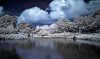
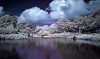
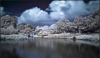
Hi guys would like to ask, how to you remove the magenta color at the center of the image on the sky, trees and water. Thanks in advance! 
.
.
Welcome to Photoshop Gurus forum. Register a free account today to become a member! It's completely free. Once signed in, you'll enjoy an ad-free experience and be able to participate on this site by adding your own topics and posts, as well as connect with other members through your own private inbox!


I tried using color correction in all the image but doesn't erase the magenta completly so i add some desaturate, color correction with selection adjustments aswell. Maybe someone know an easy and effective method.Cheers!
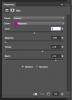
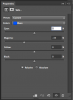
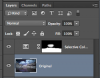
Hi IamSam, i speaked with the op by mp, my mistake was to say "color correction", i had look at the name of the tool in english photoshop and its called "selective colour".
Cheers!
I just edited the original post, in case someone else need it.
Hi Argos i already re post processed the image using your tips! Here is the link.
https://500px.com/photo/162100443/i...nard-go?ctx_page=1&from=user&user_id=15344961
Thank you sir Argos!
@IamSam
Did you leave your working colour profile on this deliberately?
It may not look right to everyone else unless its in sRGB.
Haven't noticed this before with your images so just thought I'd mention it.
Regards.
MrToM.
Nice! i think if you want you also can improve the colours on the trees and grass, looks kind of odd yellow old photo, in some parts. Unless thats is what youre were looking for of course.
Cheers!