hello, I joined this community because I am having a lot of trouble wrapping my head around photoshop. i have been using gimp for a while and though i am no master i believe i know the basics of it and can navigate through it without too much trouble but Photoshop just confuses the hell out of me and leaves me speechless with its vast arsenal of options and brushes.
anyways i am working on a little project of mine and i need to cross-over some pre-existing textures together to make it look good. I doubt i have the talent to make the whole thing myself so i just 'merge' things together. until now GIMP was enough but now it is becoming increasingly difficult to achieve good results.
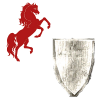
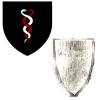
so for example in the picture below i want the left symbol to be placed 'over' the white shield but at the same time i want all the black details, that resemble a wooden shield, to be found on the symbol therefore making the white wooden shield look like a wooden shield with a sigil/symbol painted on it. when i try this with gimp and play around with the various layers i never get the symbol + the wooden-like texture over it without having the white or some other color contrast ruin the 'realism' of the shield art.
thank you for any help and assistance.
please be detailed in your instructions, i still dont know where all the tools are
anyways i am working on a little project of mine and i need to cross-over some pre-existing textures together to make it look good. I doubt i have the talent to make the whole thing myself so i just 'merge' things together. until now GIMP was enough but now it is becoming increasingly difficult to achieve good results.
so for example in the picture below i want the left symbol to be placed 'over' the white shield but at the same time i want all the black details, that resemble a wooden shield, to be found on the symbol therefore making the white wooden shield look like a wooden shield with a sigil/symbol painted on it. when i try this with gimp and play around with the various layers i never get the symbol + the wooden-like texture over it without having the white or some other color contrast ruin the 'realism' of the shield art.
thank you for any help and assistance.
please be detailed in your instructions, i still dont know where all the tools are