DeadWeatherMilo
New Member
- Messages
- 1
- Likes
- 0
Hello fellow photoshop users!
I need some advice and a friend recommended this forum.
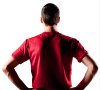
What I'm trying to do is add shapes, change colors and such on the attached image and was wondering if anyone had any suggestions or guides to make these changes look realistic.
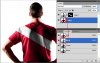
The first problem I've encountered was adding white stripes to the shirt. I've tried layer modes, adjustment layers and using displace filter, but I cannot seem to get this the right way, the white never gets the texture of the shirt (thought of maybe finding the same shirt texture or getting it directly from the image and then applying it to the white stripes) nor does it look like real white colored stripes on it.
I'd really appreciate any help I can get on this :S
I need some advice and a friend recommended this forum.
What I'm trying to do is add shapes, change colors and such on the attached image and was wondering if anyone had any suggestions or guides to make these changes look realistic.
The first problem I've encountered was adding white stripes to the shirt. I've tried layer modes, adjustment layers and using displace filter, but I cannot seem to get this the right way, the white never gets the texture of the shirt (thought of maybe finding the same shirt texture or getting it directly from the image and then applying it to the white stripes) nor does it look like real white colored stripes on it.
I'd really appreciate any help I can get on this :S