What's new
Photoshop Gurus Forum

Welcome to Photoshop Gurus forum. Register a free account today to become a member! It's completely free. Once signed in, you'll enjoy an ad-free experience and be able to participate on this site by adding your own topics and posts, as well as connect with other members through your own private inbox!

need to understand the colors..


moy

New Member
Messages
3
Likes
0
hi everyone.. can you give me some TIPS how to put perfect or mix some colors in fonts or in making some gradiants , because i always get confuse every time i design..

-thank you.
 
Not sure I understand, but you can use layer styles to add color, patterns, etc.etc but if you want to edit the font (text), you will need to rasterize the text first
 
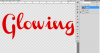
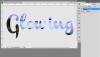
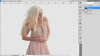
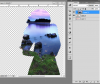
Or if you want to apply a gradient to the text, you can use layer effects. You can also clip any pattern or color combination on a layer above the text. Make text. Paste the picture, etc., that you would like to be inside the text. Make sure it is on a layer above the text. Hold down the alt/opt key and click your cursor between those two layers. You have now crated a clipping path and the image or pattern above will be constrained/contained in the selection below. You can do this for any selection below, text or otherwise. You can also move the pattern/image layer around to get the right image/colors, etc. to show through.

Example text and landscape pic

clip1a.PNG
clip1.PNG

Other selection

clip2a.PNG
clip2.PNG
 
OP are you talking about kuler? In ps click on window/extensions/Kuler. Kuler is a tool to help with colour harmonies. Google it.
 

Back
Top