What's new
Photoshop Gurus Forum

Welcome to Photoshop Gurus forum. Register a free account today to become a member! It's completely free. Once signed in, you'll enjoy an ad-free experience and be able to participate on this site by adding your own topics and posts, as well as connect with other members through your own private inbox!

Squircle


evren

Well-Known Member
Messages
145
Likes
21
How can i make a squircle like this on photoshop?

Difference between a rounded square and squircle:
A squircle looks very similar to a rounded square. However, unlike a rounded square, where the curved corner transitions directly into a straight line˜— the line and the corner both gently curve together to form a slightly more circular and rounded shape.

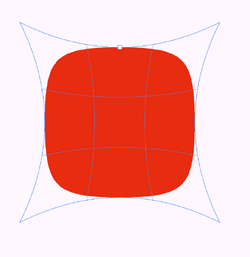
Screenshot001.jpg
 
  1. Make a circle with the ellipse tool (U)
  2. Convert it into a smart object.
  3. Select the shape with the Move Tool (V)
  4. Activate free transform (Ctrl + T)
  5. Then right-click, choose Warp > Inflate.
  6. Play around with the handle to get the desired shape. (pull inwards)
1791899010044.png
 
Last edited by a moderator:
  1. Make a circle with the ellipse tool (U)
  2. Convert to a Smart Object.
  3. Activate free transform (Ctrl + T)
  4. Then right-click, choose Warp > Inflate.
  5. Play around with the handle to get the desired shape. (pull inwards)

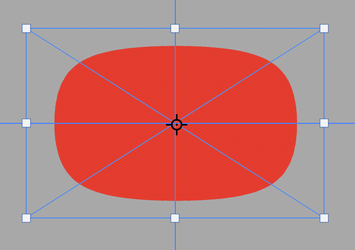
You can even make a rectircle using free transform, holding the Option/Alt key and dragging one of the horizontal handles.......

Screen Shot 2026-10-13 at 10.05.15 AM.png

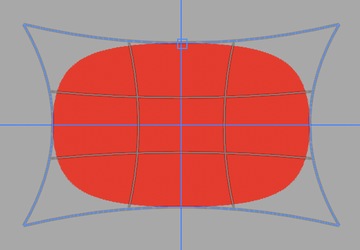
The rectircle is still editable in free transform > warp > inflate.....
Screen Shot 2026-10-13 at 10.05.44 AM.png
 

Back
Top