
Photoshop Gurus Forum
Welcome to Photoshop Gurus forum. Register a free account today to become a member! It's completely free. Once signed in, you'll enjoy an ad-free experience and be able to participate on this site by adding your own topics and posts, as well as connect with other members through your own private inbox!
You are using an out of date browser. It may not display this or other websites correctly.
You should upgrade or use an alternative browser.
You should upgrade or use an alternative browser.
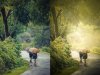
URGENT..How to get this type effect ??
- Thread starter vky
- Start date

besmirched
Power User
- Messages
- 221
- Likes
- 94
Homework?


iDad
Guru
- Messages
- 8,715
- Likes
- 2,556
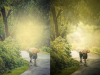 At first glance what I think you can do is put up blank layer on top select the color you want to use I used white I used a large paintbrush with soft edges 64% flow, put the top layer in Pin light mode used gaussian blur a bit. Tweaking will be needed but I think you’d get there perhaps also using your brightness or contrast controls and transparency levels. Not saying that’s the only way to do it but it’s a route worth trying
Tom Mann
Guru
- Messages
- 7,125
- Likes
- 4,312
It's very possible that the artist who did the tweaked version you posted used plugins and got the effect in only a few mouse clicks, but reproducing it using only native PS tools can be tedious and you have to have a good eye to spot what's going on. Depending on the level of accuracy with which you want to reproduce this look, there are a lot of subtle efx put into the postprocessed version you posted that you would have to reproduce.
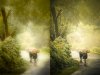
iDad picked up the most prominent efx. I did my own quick and dirty version which picked up some other efx, but missed others (eg, slight blurring of the trees, keeping the texture of the road sharp,etc.). I certainly am not going to work this to completion for a quick, freebie demo.
To do a really accurate job is going to take some time, as well as a familiarity with quite a few different basic photoshop skills. For example, after getting the overall color change in the right ball park, I had to burn and dodge areas, paint saturation in and out in other areas, blur in the "lighten" mode to soften areas, etc.
Since you asked the question, you are obviously in the process of learning the techniques. I would suggest that you work on them one at a time instead of jumping into the deep end of the pool trying to mimic an image that has many efx going on, all at once.
HTH,
Tom M
iDad picked up the most prominent efx. I did my own quick and dirty version which picked up some other efx, but missed others (eg, slight blurring of the trees, keeping the texture of the road sharp,etc.). I certainly am not going to work this to completion for a quick, freebie demo.
To do a really accurate job is going to take some time, as well as a familiarity with quite a few different basic photoshop skills. For example, after getting the overall color change in the right ball park, I had to burn and dodge areas, paint saturation in and out in other areas, blur in the "lighten" mode to soften areas, etc.
Since you asked the question, you are obviously in the process of learning the techniques. I would suggest that you work on them one at a time instead of jumping into the deep end of the pool trying to mimic an image that has many efx going on, all at once.
HTH,
Tom M
Attachments


photoshopguru33
Member
- Messages
- 11
- Likes
- 0
To be honest, even if it looks quite cute as effect, I don't think is a professional effect. I'm not sure about the correct effect of blur would looks like that in real life...