Hi everyone,
First time posting in this forum, and I didn't find this question posted before. If it has been, sorry for the double post...
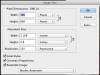
I've been working in Photoshop for about 8 years now. Most of my time using the program was on a PC at my old office. At home and at my new office though, we're Mac based. The only feature I miss about the PC version of PS is the functionality of the tab key. On a PC, you can use the tab key to navigate through any field in a dialogue box (i.e. in the Image Size dialogue, hitting the tab key will scroll through the fields moving from left to right, and then down to the next line continuing the left to right movement). On the Mac however, it only allows certain fields to be accessed using the tab key.
I have searched high and low online trying to find an answer to this, and have had no luck. The only answer I've come across is in the keyboard settings of the Mac, and it's an option to allow the tab key move the focus between all fields/controls. I have tried this option and while it works with every other program on my Mac, it does not change anything in Photoshop.
This may seem like a minor gripe, but when going through repetitive actions in PS and using my keyboard to navigate almost everything else, it puts a pretty big kink into my workflow to not be able to do this. I'm hoping that someone here has either figured out a solution, discovered a work around, or knows why Adobe would block this on the Mac and not the PC.
Thanks for any help you can provide!
Tim
First time posting in this forum, and I didn't find this question posted before. If it has been, sorry for the double post...
I've been working in Photoshop for about 8 years now. Most of my time using the program was on a PC at my old office. At home and at my new office though, we're Mac based. The only feature I miss about the PC version of PS is the functionality of the tab key. On a PC, you can use the tab key to navigate through any field in a dialogue box (i.e. in the Image Size dialogue, hitting the tab key will scroll through the fields moving from left to right, and then down to the next line continuing the left to right movement). On the Mac however, it only allows certain fields to be accessed using the tab key.
I have searched high and low online trying to find an answer to this, and have had no luck. The only answer I've come across is in the keyboard settings of the Mac, and it's an option to allow the tab key move the focus between all fields/controls. I have tried this option and while it works with every other program on my Mac, it does not change anything in Photoshop.
This may seem like a minor gripe, but when going through repetitive actions in PS and using my keyboard to navigate almost everything else, it puts a pretty big kink into my workflow to not be able to do this. I'm hoping that someone here has either figured out a solution, discovered a work around, or knows why Adobe would block this on the Mac and not the PC.
Thanks for any help you can provide!
Tim