
Hello,
I would be so appreciative if someone could answer this for me:
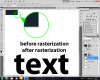
I upgraded to Photoshop CS5 at work and at home - one is the 32-bit version; the other is 64-bit. In both applications, I cannot seem to get custom vector masks, text, or shapes to show up as vector artwork. Instead, they all show up pixelated and anti-aliased like a regular layer mask. Likewise, I see no visible difference between a raw text layer and a text layer that I have rasterized. It is as if I were drawing vectors in Illustrator CS5 with pixel preview turned on, but I cannot seem to find a pixel preview setting in Photoshop.
Thanks you so much for any help!!!
Below is a screenshot to show you what I mean (this is my first time posting, so I am assuming that you will be able to click on it to view the full thing).
I would be so appreciative if someone could answer this for me:
I upgraded to Photoshop CS5 at work and at home - one is the 32-bit version; the other is 64-bit. In both applications, I cannot seem to get custom vector masks, text, or shapes to show up as vector artwork. Instead, they all show up pixelated and anti-aliased like a regular layer mask. Likewise, I see no visible difference between a raw text layer and a text layer that I have rasterized. It is as if I were drawing vectors in Illustrator CS5 with pixel preview turned on, but I cannot seem to find a pixel preview setting in Photoshop.
Thanks you so much for any help!!!
Below is a screenshot to show you what I mean (this is my first time posting, so I am assuming that you will be able to click on it to view the full thing).
