In Photoshop CS6 (64bit), when using the brush tool (with a brush with pressure sensitivity activated), I quite often get a line drawn at the max width selected, as if there was no pressure sensitivity.
Everything goes back to normal after I start drawing another line, and happens again after a few lines. It's quite random.
I don't have this problem in any other software (Illustrator CS64, Painter XII, Sketchbook Pro, ...).
I have already checked and I've found some other users on other forums with the same problem.
Some of those users seem to have solved their problem by installing an old driver (6.1.5r3), but they had that problem with Intuos TABLETS in the first place, not a Cintiq 24HD... I have tried that, but unfortunately the driver is not compatible with the Cintiq 24HD.
To test this out: I've been able to reproduce the problem 90% of the times I've tried.
if I keep the pen at 1 inch from the display so that it's still recognized by the screen but it's not drawing, then wiggle it a bit, and then I slowly move to the screen and tap it (as if I was starting a line with very low pressure), the problem appears and it makes a large dot, as if there was no pressure sensitivity.
As I said the test doesn't work every time, but almost.
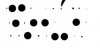
The image attached to this post shows what happens when I try and make dots in Photoshop.
Those are done trying to push the pen with the same (low) pressure. The big ones are from when the issue appears.
I have tried the pressure test in the Wacom utility software and it seems to work fine, it never jump to full even when I try the method I've just described.
In the diagnostic page of the Wacom utility software the pressure is always correct, even when in Photoshop there's the brush sensitivity issue.
Everything goes back to normal after I start drawing another line, and happens again after a few lines. It's quite random.
I don't have this problem in any other software (Illustrator CS64, Painter XII, Sketchbook Pro, ...).
I have already checked and I've found some other users on other forums with the same problem.
Some of those users seem to have solved their problem by installing an old driver (6.1.5r3), but they had that problem with Intuos TABLETS in the first place, not a Cintiq 24HD... I have tried that, but unfortunately the driver is not compatible with the Cintiq 24HD.
To test this out: I've been able to reproduce the problem 90% of the times I've tried.
if I keep the pen at 1 inch from the display so that it's still recognized by the screen but it's not drawing, then wiggle it a bit, and then I slowly move to the screen and tap it (as if I was starting a line with very low pressure), the problem appears and it makes a large dot, as if there was no pressure sensitivity.
As I said the test doesn't work every time, but almost.
The image attached to this post shows what happens when I try and make dots in Photoshop.
Those are done trying to push the pen with the same (low) pressure. The big ones are from when the issue appears.
I have tried the pressure test in the Wacom utility software and it seems to work fine, it never jump to full even when I try the method I've just described.
In the diagnostic page of the Wacom utility software the pressure is always correct, even when in Photoshop there's the brush sensitivity issue.