
When I open an oversaturated RGB image, the most oversaturated blue pixels appear as black. In Preview window the image seems normal.
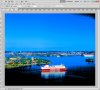
It started when I changed my CS3 to CS5.5, in both 32 bit and 64 bit PS. And it happens in both 8 bit/channel and 16 bit/channel mode.
When I convert the image to 32 bit/channel, the black colour dissappears. And also when I convert it to cmyk.
Gamut Warning color is gray, and it is not turned on.
Some kind of warning? Where can I turn it off?
Regards
Heikki
It started when I changed my CS3 to CS5.5, in both 32 bit and 64 bit PS. And it happens in both 8 bit/channel and 16 bit/channel mode.
When I convert the image to 32 bit/channel, the black colour dissappears. And also when I convert it to cmyk.
Gamut Warning color is gray, and it is not turned on.
Some kind of warning? Where can I turn it off?
Regards
Heikki