What's new
Photoshop Gurus Forum

Welcome to Photoshop Gurus forum. Register a free account today to become a member! It's completely free. Once signed in, you'll enjoy an ad-free experience and be able to participate on this site by adding your own topics and posts, as well as connect with other members through your own private inbox!

Within 'Image/Adjustment/'.. why should I use Levels on photos?


Wetstuff

Well-Known Member
Messages
52
Likes
4
I look at 'Levels', and tweak the sliders .. but end up 80% of the time with 'Shadows/Highlights' to pull out the image. I make things using a lot of black, so I have these deep shadows..

GP_arm_angle.JPG


I keep thinking I must be making a mistake -because all the books I have had always seem to put the emphasis on Levels.


Jim
 
I'm assuming it's probably preference. Levels allows you to adjust simultaneously the lights darks and mid-tones to the general area you want them to be. I bet if you messed around with all three arrows in the levels panel you might learn to find it more versatile. If the other tool works, though, I'd ignore the books.
 
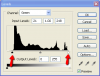
what i usually do is adjust each channel separately and place the arrow at the end of where the black part starts
here is what i mean
level-adj.png
thats just a start point
 

Back
Top