
Hi, guys-
I'm a writer and what you see below was my first published article back in 1999, therefore I would like to have a good copy.
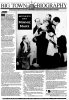
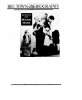
As you can tell, the newspaper in the image is beat up and faded, so I thought I would chop up the JPG, lay it all out again in PS and fly in my text.
Having a devil of a time.
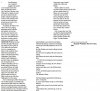
When I select text from WORD and paste it into a PS Text box, there are enormous gaps in between sentences. After much finagling and google attempts at help, I thought I'd come here and show you what I mean - maybe someone knows how I can fly my text into the re-done article so it looks exactly like the newspaper copy, except the text is crispy and clear-y.
Thanks in advance!
Original newspaper article:
New layout:
Text - I tried to lay it out so it would sorta fit the format of the original article. FAIL
Again, thanks.
I'm a writer and what you see below was my first published article back in 1999, therefore I would like to have a good copy.
As you can tell, the newspaper in the image is beat up and faded, so I thought I would chop up the JPG, lay it all out again in PS and fly in my text.
Having a devil of a time.
When I select text from WORD and paste it into a PS Text box, there are enormous gaps in between sentences. After much finagling and google attempts at help, I thought I'd come here and show you what I mean - maybe someone knows how I can fly my text into the re-done article so it looks exactly like the newspaper copy, except the text is crispy and clear-y.
Thanks in advance!
Original newspaper article:
New layout:
Text - I tried to lay it out so it would sorta fit the format of the original article. FAIL
Again, thanks.

 I'll scoot on over to the websites you mentioned.