-
Guru
Official October 2010 PSG Contest Sponsored by StuckInCustoms.com HDR Photography

This is an official PhotoshopGurus.com contest sponsored by StuckInCustoms.com
Winner Will Receive:
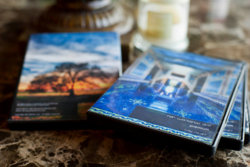
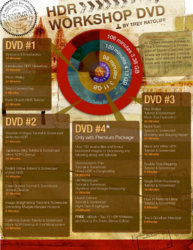
HDR Workshop Premium DVD. Value $399
Quick Overview and How to Enter:
Create and post one or several Graphic Design/Photoshop Tutorials in either the Forum Tutorials or Photoshop Tutorial Videos or Quick-Tips and Techniques sections of the forum.
After you have posted a tutorial make a reply in this thread and tell us about the tutorial. Follow the example post and the rest of the rules here.
After the close of the contest the person with the best entry or entries will be chosen.
Rules:
The tutorial(s) you post must be original and created by you. You must not post other people's work and you must not copy/plagiarize tutorials created by others.
You can post either written (text and image) tutorials, or video tutorials. They must be for Adobe Photoshop or for directly related Graphic Design/Photography/Illustration software that can be used in conjunction with Photoshop. For example they can be for popular Photoshop plugins, or for integrating Photoshop with video or 3D programs such as After Effects, 3DS Max, Illustrator, Maya, etc.
If you post a text based tutorial please include screen shots of each step whenever it would be helpful. For video tutorials please have a clear mic or clearly written instructions on-screen... videos without clear instruction that are hard to follow will not qualify.
If you encounter problems or need help making a tutorial (things like taking a screen shot, names of tools used, how to format your post, etc.) you are welcome to post up in the forum and ask for help.
Deadline:
All entries must be submitted on or before November 14, 2010
The Fine Print
By entering, Entrant represents that he or she owns or has the rights to convey any and all right and title in photo(s), screen shots, videos, or digital illustration(s) submitted as part of the contest entry. By entering, Entrant grants to Sponsor and/or PhotoshopGurus.com a non-exclusive, worldwide, royalty-free copyright license to edit, publish, promote, republish at any time in the future and otherwise use Entrant's submitted photo(s), video(s0, and text along with Entrant's name and likeness, in any and all media for possible editorial, promotional or advertising purposes, without further permission, notice or compensation (except where prohibited by law). By participating in the Contest, Entrant agrees to release Sponsor and/or PhotoshopGurus.com and its parent, affiliates, subsidiaries, and employees from any and all liability, claims or actions of any kind whatsoever for injuries, damages or losses to persons and property which may be sustained in connection with the receipt, ownership, possession, use, or misuse of any prize.
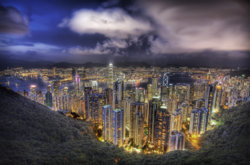
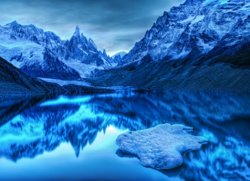
Some HDR Photography Images from the Sponsor StuckInCustoms.com:



-
-
Guru
Example Entry Post
Tutorial Link:
How to Take a Screenshot (Capture Image of Your Screen)
About the Tutorial:
This is a tutorial I made on how to take a screenshot and then paste it into Photoshop. It's a basic tutorial that might help someone who is making a tutorial for this contest
-
-
Power User
Wow awesome contest!
Thanks for doing this!
-
-
Guru

Originally Posted by
Gaussian
Example Entry Post
Tutorial Link:
How to Take a Screenshot (Capture Image of Your Screen)
About the Tutorial:
This is a tutorial I made on how to take a screenshot and then paste it into Photoshop. It's a basic tutorial that might help someone who is making a tutorial for this contest

Gaus
So then i take it the tutorial can be really simple as long as it's original?? Btw, some of those HDR photos are KICK @SS!!!
-
-
Guru
Well, the one I posted is not an entry but simply an example of what to post here after you make a tutorial.... but yes the tuts can be simple... or they can be complex.... there's not really any limitations on what type of tutorial you can post.
The things we are looking for are originality and usefulness, as well as being easy to follow and written/formatted properly.
-
-
Member
Re: Official October 2010 PSG Contest Sponsored by StuckInCustoms.com HDR Photography
Tutorial Link:
Basic Fire-Ball effect
About the tutorial:
This is a basic and easy tutorial on how to make a fireball. The technique used in this tutorial can be very useful for beginning and possibly intermediate photoshop users, as it can be applied to many different uses other than making a fireball.
Last edited by rhstanley3; 10-01-2010 at 08:36 PM.
-
-
Guru
Re: Official October 2010 PSG Contest Sponsored by StuckInCustoms.com HDR Photography
Today was supposed to be the day this contest closes, but with only one entry I am going to extend the deadline to the end of the month.
This is a fantastic prize ladies and gents, get some tutorials up and enter them!
New close date is Nov. 30 I hope we get more entries by then, it will not be extended again.
Best of luck!
-
-
Guru
Re: Official October 2010 PSG Contest Sponsored by StuckInCustoms.com HDR Photography
Hmmmmm, I really stink at tuts making but I just might give it a shot think think think......... ;)
-
-
Power User
Re: Official October 2010 PSG Contest Sponsored by StuckInCustoms.com HDR Photography
can we make a simple tutorial for people new to photoshop?
-
-
Guru
Re: Official October 2010 PSG Contest Sponsored by StuckInCustoms.com HDR Photography
I'm not quite sure I've got this down to the very letter, but if this contest is still on until Nov 30 I'll chip in the last ones I did just to get this thing on the road again.
They're all in the Photoshop Video Tutorials section, btw.
The Photoshop Rain Effect - again - and taken one step further
About the tutorial:
This is a video tutorial on one technique to make the Rain Effect in Photoshop and with a suggestion on how to take it a step further.
The Even Line Problem
About the tutorial:
A video tutorial on why lines comes out blobby when using the Brush Tool and what to do to get them even.
Intro to The Levels Panel
About the tutorial:
A basic introduction to the Levels Panel (Static Adjustment and Adjustment Layer), how it works, what it tells you and how to use it.
C'mon ppl - get busy with tutorials and let's put Photoshop Gurus on the map ! 
iDad - you can do this !!!
--- DKJ ---
Last edited by JgraphNet; 11-16-2010 at 10:55 AM.
-
Posting Permissions
- You may not post new threads
- You may not post replies
- You may not post attachments
- You may not edit your posts
Forum Rules
Powered by
vBulletin® Version 4.1.9
Copyright © 2012 vBulletin Solutions, Inc. All rights reserved.
Content Relevant URLs by
vBSEO 3.6.0
Copyright 2011 Photoshop Gurus Forum. All rights reserved.