
+ Reply to Thread
Results 1 to 9 of 9

Thread: Lighting Glow?

  1. #1
    Newbie
    Join Date
    Jan 2011
    Posts
    1
    Thanks
    0
    Thanked 0 Times in 0 Posts

    Lighting Glow?

    Good evening all.

    Im after some advice on the best way to produce some effects like this
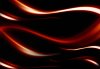
    Lighting Glow?-1200002.jpg

    I hope image is attached?

    Is this photoshop, after effects?

    Plugin?

    or done by hand..

    I would not know where to start?

  2. #2
    Guru
    Join Date
    Jan 2011
    Location
    Elizabeth Port NJ
    Posts
    1,503
    Thanks
    15
    Thanked 149 Times in 143 Posts

    Re: Lighting Glow?

    think some brush and layer fx, i could be wrong dough
    i will like to know how to do that as well.
    Cuando soy Bueno, soy muy BUENO
    Pero cuando soy malo, soy mucho MEJOR

  3. #3
    Member
    Join Date
    Jan 2011
    Location
    San Francisco
    Posts
    32
    Thanks
    0
    Thanked 0 Times in 0 Posts

    Re: Lighting Glow?

    I don't use illustrator very much, but it looks like they at least started there. That would be the best way to get smooth shapes.

    Then - duplicate layer & set layer mode 'screen'! that's they key! Then repeat and apply a gaussian blur to this 'screened' layer.

    Here's a fantastic article on glows: Atomic Fiction » Blog Archive » Glow Madness

  4. #4
    Forum Mod
    Join Date
    Mar 2002
    Location
    Here... ?
    Posts
    5,001
    Thanks
    10
    Thanked 191 Times in 189 Posts

    Re: Lighting Glow?

    First time for me to see this post.....

    Now where did I see a tute for something like this? ........

  5. #5
    Power User
    Join Date
    Sep 2010
    Posts
    207
    Thanks
    4
    Thanked 9 Times in 8 Posts

    Re: Lighting Glow?

    I remember it because I made the post! Erika I have found it here: Create glowing aura/outline as example?

    I think this was the answer to another post somewhere else in the forum~
    Last edited by Carrie56; 05-13-2011 at 09:43 PM.

  6. #6
    Forum Mod
    Join Date
    Mar 2002
    Location
    Here... ?
    Posts
    5,001
    Thanks
    10
    Thanked 191 Times in 189 Posts

    Re: Lighting Glow?

    Quote Originally Posted by Carrie56 View Post
    I remember it because I made the post! Erika I have found it here: Create glowing aura/outline as example?

    I think this was the answer to another post somewhere else in the forum~
    Not exactly.... the tute I'm talking about , also here in PSG, is dated early 2000 and was a variation/modification of the motion trail. At the time I took the tute a step further and managed to create something exactly like those in the image above.

    I couldn't find it nor a record in my back-ups. The thread must have not been included when the forum migrated to the new servers. Even if the thread is still there, the images wouldn't be.....

  7. #7
    Forum Mod
    Join Date
    Mar 2002
    Location
    Here... ?
    Posts
    5,001
    Thanks
    10
    Thanked 191 Times in 189 Posts

    Re: Lighting Glow?

    Quote Originally Posted by Carrie56 View Post
    I remember it because I made the post! Erika I have found it here: Create glowing aura/outline as example?

    I think this was the answer to another post somewhere else in the forum~
    I noticed and I went .... lol

  8. #8
    Power User
    Join Date
    Sep 2010
    Posts
    207
    Thanks
    4
    Thanked 9 Times in 8 Posts

    Re: Lighting Glow?

    Think I must have been half asleep when I made these posts sorry off topic!

    It seems like you could use the pen tool to make the lines and just stroke the path using different brushes then add some effect to get that result, maybe if I get time I will play around some see what I can come up with.
    Last edited by Carrie56; 05-15-2011 at 10:48 AM.

  9. #9
    Junior Member
    Join Date
    May 2011
    Posts
    6
    Thanks
    0
    Thanked 0 Times in 0 Posts

    Re: Lighting Glow?

    You just have to either:

    A) go through a lot of different brush sizes, strokes, and opacity to recreate the shapes and then change blending options for color burn and screen.
    B) find a brush that makes the shapes similar to the ones you want, and use 3 different layers (normal, screen, and color burn)

    for both of these, you can start with just a black and white image(white for light spots of course) and then change image color balance to acheive your initial color


Tags for this Thread

Posting Permissions

  • You may not post new threads
  • You may not post replies
  • You may not post attachments
  • You may not edit your posts
Powered by vBulletin® Version 4.1.9
Copyright © 2012 vBulletin Solutions, Inc. All rights reserved.
Content Relevant URLs by vBSEO 3.6.0
Copyright 2011 Photoshop Gurus Forum. All rights reserved.
All times are GMT -5. The time now is 12:40 PM.
vBulletin Skins