
1Likes
-
Junior Member
How to give my photo a "mounted" on canvas look?
Hi
I'm trying to mock up my photos so they look mounted on a canvas, with the image stretched and wrapped around the edges. Refer to the attached images for reference.

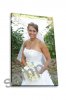
I'm sure this is pretty straightforward.. change the perspective of the image, add edges, change the lighting and add a drop shadow to give it a 3d effect.. but I really have no idea how as I am very new to Photoshop.
If someone can help and give me a little tutorial that would be great! Thanks so much!
-
-
Guru
Re: How to give my photo a "mounted" on canvas look?
for being new you sure seem to know the process
-
-
Administrator
Re: How to give my photo a "mounted" on canvas look?
You posted before and after images.
Are you saying you didn't do the after shots yourself and want to know how?
-
-
Power User
Re: How to give my photo a "mounted" on canvas look?
Looks like a job for vanishing point. I would do a search for vanishing point tutorials.
-
-
Junior Member
Re: How to give my photo a "mounted" on canvas look?
Yes the before/after pictures I posted were not done by me, I am trying to learn how to do it in photoshop!
-
-
Guru
Re: How to give my photo a "mounted" on canvas look?
1-Make a selection of the edge with marque tool
2-Transfrom perspective
3-Add a small white line on the edge
4-Transform distort
5-Add a drop shadow
-
-
Power User
Re: How to give my photo a "mounted" on canvas look?
Much easier that way.....Vanishing Point turned out to be more of a challenge than I remembered. :-(
-
-
Administrator
Re: How to give my photo a "mounted" on canvas look?

Originally Posted by
hawkeye
.................... 5-Add a drop shadow
Did you do the drop shadow just for me Hawkeye?? 
3D rectangular box
Just messing with Hawkeye gwong, we had a similar question a while ago.
Last edited by Steve; 03-22-2011 at 06:45 PM.
-
-
Junior Member
Re: How to give my photo a "mounted" on canvas look?
Thanks so much! This is great, will give it a try!!
-
-
Guru
Re: How to give my photo a "mounted" on canvas look?

Originally Posted by
Stric9
Much easier that way.....Vanishing Point turned out to be more of a challenge than I remembered. :-(
The man's got a good memory...
-
Posting Permissions
- You may not post new threads
- You may not post replies
- You may not post attachments
- You may not edit your posts
Forum Rules
Powered by
vBulletin® Version 4.1.9
Copyright © 2012 vBulletin Solutions, Inc. All rights reserved.
Content Relevant URLs by
vBSEO 3.6.0
Copyright 2011 Photoshop Gurus Forum. All rights reserved.