What's new
Photoshop Gurus Forum

Welcome to Photoshop Gurus forum. Register a free account today to become a member! It's completely free. Once signed in, you'll enjoy an ad-free experience and be able to participate on this site by adding your own topics and posts, as well as connect with other members through your own private inbox!

Please help me with this tutorial


oops2001

Member
Messages
10
Likes
0
Hello everyone,
I am a beginner in photoshop but I do understand the basics. I am trying to follow this tutorial but its written badly for a beginner, So I request you to kindly rephrase it or explain the each step very clearly.

Paint Effect | Special Effects

Thank you
 
What is it that you don´t understand? :) It will be easier to help you if you say which parts you want explained. :)
 
Hello Vafann .. I am lost in STEP 5 and STEP 6 :(

Ok, do you mean that you don´t know how to drag the splatter layer under the layer you created? They have written it strangely, the wording is confusing.

This "drag the splatter layer under the layer you just created by pressing Ctrl and V.." sounds like you are supposed to drag the layer by pressing Ctrl and V.

They just mean that you are supposed to drag it under the layer you created by doing that.

To drag a layer under another one, you go to the layers palette, click on the layer you want to move, hold down the left mouse button and then just drag the layer up or down to where ever you want it.

Is this what you mean or is this even more confusing? :)
 
Thanks Vafann,, Still I am not getting the result. I am posting a link to my end result which is very different from the result in that tutorial [ Please see I am not getting the sticky paint effect as it is in that tutorial ] and Attaching my PSD file. Please check... thank you for your time :)


Uploaded with http://imageshack.us
 

Attachments

Thanks Vafann,, Still I am not getting the result. I am posting a link to my end result which is very different from the result in that tutorial [ Please see I am not getting the sticky paint effect as it is in that tutorial ] and Attaching my PSD file. Please check... thank you for your time :)


Uploaded with http://imageshack.us

Hi again oops! I have just been trying to follow that tutorial for over an hour now, and I give up. I think they have left something out and I can´t figure out what it is, it doesn´t work as far as I can tell. You are right, it gets impossible starting at step #5 if you do exactly what it says. maybe someone else here can figure out what the problem is, or else I would suggest trying a better tutorial. Sorry I couldn´t help more, but I tried.. :)
 
Thanks for your time Vafann yes it was very badly written...I found a video on youtube and woala !! works like a charm and got amazing end result:) Gives the correct technique

 
Thanks for your time Vafann yes it was very badly written...I found a video on youtube and woala !! works like a charm and got amazing end result:) Gives the correct technique


Oh you´re welcome! I´m glad it worked out for you! :)
 
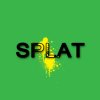
splatter.jpg

It's pretty simple:

1) Type the text you want.
2) Create a new layer then with the splatter you want to use selected as your brush then click where you want it.
3) Hold ctrl and click on the thumbnail of the text layer then with the splatter layer selected press crtl+J to duplicate the layer.
4) Move the text layer above the first splatter an under the one you just created so it's in the middle.
5) Right click > blending options, on the text layer, click drop shadow and use whatever settings you want (I used distance: 4, spread: 10, size: 7)

Hope that helps, let me know how you get on :)
 
lol paul :P very nice...

and Yes Boomawoom :).somehow I managed to find that video..and..aah finally. But thanks a lot m8..
 
Just an idea Did not even bother reading the tutorial but do your splatter brushes then your text layer on top copy 1 of your splat layers above the text right click it and select create clipping mask I also added a stroke to the text this is just using your psd
SPLAT.jpg
 

Back
Top