What's new
Photoshop Gurus Forum

Welcome to Photoshop Gurus forum. Register a free account today to become a member! It's completely free. Once signed in, you'll enjoy an ad-free experience and be able to participate on this site by adding your own topics and posts, as well as connect with other members through your own private inbox!

Bad Lighting at the photoshoot


johnsilvia

Well-Known Member
Messages
69
Likes
0
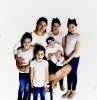
Hey guys one of my strobes fail on me during photo shoot.

theres a picture that the client really wants.. any idea how i can fix it? like what techniques>?

Thank you Alll!

fix.jpg
 
Do you have lightroom and a raw version of the picture you can just add fill light to balance out the lack of the strobe

all though you can probably get a good effect in ps/ lightroom it will never be as good as if the strobe fired because your camera would be metering for that light level etc so if you fake it then you are a lot more limited on effects.

I will have a dabble with that image see what I can get and see if I can add some catch lights etc and then explain the best process for you to play around with
 
Tom is the man! But, it can be fixed, even by a hacker. Proof attached. But Tom can give you the best advice for sure.
fix2.jpg
 
Ok an easy fix is not possible I have edited this picture from the ground up starting with easy fixes to getting to more complex fixes and I am sorry but I cant really give you a step by step tutorial we would be here all night and you will get bored of reading it.

use lots of layers to clone out back ground distractions

add a levels adjustment layer and blow out the image almost completely then on the layer mask paint in black over your models long job to do it properly.

I virtually put in a new floor only subtle but to mimic a seamless floor and to tidy up the cables they are standing on

I then added an exposure and curves adjustment layer to increase the subjects lighting but not to muc

I then added some tiny catchlights into the eyes

I repainted in some details and cloned hair etc back in

and then did some global colour adjustments etc

I think it will be easier to learn from looking at my psd please note I have merged layers etc to reduce size for upload so it is not step by step it was close to 70 layers and some of the merged layers go a bit funky but it is good enough for you to see each step.

This is what I got
fix.png

I am going to assume the upload will compress it and change it quite a bit so I really would reccommend downloading psd to see final (ish) results
View attachment fix.psd

I missed out redetailing the girls hair on the right which will need doing and yes looks terrible online even as a png
 
mmm weird uploading here this may dupe

with more contrast in the hair and fixed the blob on the floor I must of accidentally painted in
fix.png
 
Whoa, y'all need to back down on the blue saturation. The kids' pants all look way too saturated.

Also, gotta be careful with blowing out the highlights, such as the white tees.

Just my two pennies.
 
Yes your quite right if it was my image and I spent more time on it I would have added some color correction to the jeans I completely overlooked them to be honest but then if it was my image it wouldnt have made it to the editing stage there was just far to much work to do on it to make it worthwhile. and the OP can just paint out the exposure adjustment layer where he doesnt want it.

But following on if it was a raw image and not a jpeg there will be a lot more room to fine tweak it without getting all the artifacts you get from jpgs and you could increase the sharpness more. But unfortunately you can spend hours correcting it and then come back or someone will highlight something you overlooked.

There is also things to take into consideration and I do not mean this in any negative way to the original poster as he never asked for the job to be done but rather how to approach it, I assume he is getting paid to do the photo shoot and provide images or at least printable images so why should we edit for free. Unfortunately there was just way to much work involved for me to provide a proper tutorial as it was a lot of trial and error so a brief here is something you can get your image to if you put in the effort along with a started psd and yes it is only meant as to start them off then they can tweak the image to however they like with most the nitty gritty work done already.
 
View attachment 33417What I would do is duplicate the layer and then create a layer between the two a gradient layer whitish gradient, use the paint bucket fill it with white over the whole image and then put the top image in color burn mode select the white gradient layer and erace everywhere there is a person and the surrounding area leave alone and you get something like this probably 10 minutes selecting and erasing tricky but doable. I put no care into what I was doing it can be much better selecting process and erasing process is most important for fine result
 
There is more than one way to skin a cat or chase a shadow
 
That is a good method idad I like that as a good starting point it almost replicates fill light very Venture Portrait A UK Photography franchise they have a lot of that look.

follow on from mine if you add a hue saturation adjustment layer on top of the psd I provided and target the blue channel and red for skin tones you will get a far better more natural toned end result.

probably wont show up in screen capture image but you get the gist
Capture.PNG
 
OP: "...one of my strobes fail on me during photo shoot. ... there's a picture that the client really wants.. any idea how i can fix it? like what techniques>?..."

To be honest, John, for a pro shoot, you appear to be using a dreadfully inadequate, makeshift setup. For example, in addition to the missing front light (fill? key?) that you mentioned, you are also missing at least two more groups of lights that are commonly used in this sort of shot. Specifically, I see no evidence you were using any lights to blow out the background, and no evidence for hair/rim light(s).

Their absence explains why the background is such a mess and why there is no detail in their hair. Also, because the group is standing only a foot or two away from the seamless, my guess is that you are attempting to work in in an area that is too small to accommodate a group of this size.

In addition to the "missing" lights, it appears that there is a very odd, strong, fairly large area light source to the (viewer's) right of the group. The position of this source -- too low and at too far to the side -- is what is causing the monster lighting effect. Look at the shadows and bright areas on the face and shoulder of the (viewer's) right-most girl. Was there a window in that area?

I am not pointing out these deficiencies to be critical of you. Lord knows, I have shot in many makeshift studios myself. I am pointing them out only to give a sense of the magnitude of the lighting problem that you are trying to fix after-the-fact, in post.

Because of the factors mentioned above, my take on post processing is similar to what the other responders have already said: *It will be difficult*. To do it right, you need to correct for all the shortcomings mentioned above, as well as some that I did not mention. Your largest task is probably that you will need to add light to a large number of small shadow areas. These almost certainly need to be lightened manually and individually. If one tries to fill them in by global controls, you are going to see adverse effects elsewhere in the image, such as in my example image, below.

My final comment is that in a pro family shoot, the photographer always presents several images to the family for them to select from. This means that any PP efx that you apply to one image, you have to apply to all the others. This is an absolutely staggering amount of work which is far from guaranteed to produce an acceptable result. If it were me, I would fess up to them, explain the problems, and offer a free re-shoot. If you have a question about how one makes do with limited equipment, I'm sure some of the folks here will be happy to offer suggestions.

Below is my quick attempt to partially correct some of the lighting problems using only global controls. All the changes you see were done using one pass through ACR followed by one pass through Topaz Adjust. IMHO, it still is far from a pro-level shot, but hopefully, added to the previous responses, illustrates that best that can be done without spending crazy amounts of time adjusting the lighting shadow-by-shadow in each image.

HTH,

Tom

family_studio_shot-missing_1_strobe-tjm01-acr-ps02a-03_acr_and_ps-white_bkgnd-soft_focus.jpg

PS - I'm sure you have already noticed, but always be on the lookout for compositional and posing issues such as the hands-from-hell such as in the bottom left corner of this image, the giant protruding legs, etc.. ;-)

 
Last edited:

Back
Top