What's new
Photoshop Gurus Forum

Welcome to Photoshop Gurus forum. Register a free account today to become a member! It's completely free. Once signed in, you'll enjoy an ad-free experience and be able to participate on this site by adding your own topics and posts, as well as connect with other members through your own private inbox!

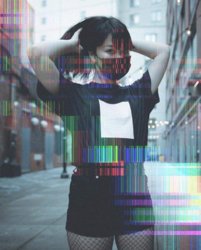
How to recreate this effect?


Btaai

New Member
Messages
2
Likes
0
Hey guys! I'm starting to explore glitch effects and was wondering if anyone knew how to recreate this effect? I couldn't find much about glitch effects other than those done on phone apps etc.

Thanks a bunch.
FB_IMG_1513603354462.jpg
 
If you do a Google image search on "glitch effects" or "JPEG artifact generator" you will find distortion effects similar to your example. You can make a Photoshop effect like this by taking any normal photo and then adding a new layer above it with the distortion image. Change the blend mode of the distortion layer. Soft Light is a good place to start, but experiment with all the blend modes to see what they do. Also play around with opacity and masks.
 
i would search that style glitch in wiki art, select tool, cut it and use it as layer, move it as background and lower its opacity
 

Back
Top