
What's new
Photoshop Gurus Forum

Welcome to Photoshop Gurus forum. Register a free account today to become a member! It's completely free. Once signed in, you'll enjoy an ad-free experience and be able to participate on this site by adding your own topics and posts, as well as connect with other members through your own private inbox!

File>New Window


Rich54

Guru
Guru
Messages
2,004
Likes
3,877
When I open the File>New window, it displays the last several items that I created. The ones labeled "custom" were one-time copy-paste files that I do not need to keep. Is there any way to suppress those from this window? All I want to see in File>Open are the current clipboard plus any presets that I have specifically saved.

For now, I have reverted to the "legacy" file open command. But this new view would be nice if it weren't so cluttered with unneeded items.

Thanks
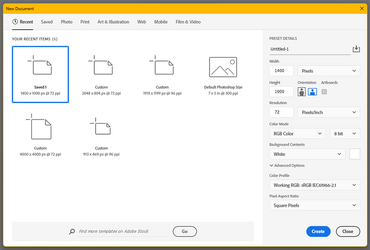
1780203634220.png
 
When I open the File>New window, it displays the last several items that I created. The ones labeled "custom" were one-time copy-paste files that I do not need to keep. Is there any way to suppress those from this window? All I want to see in File>Open are the current clipboard plus any presets that I have specifically saved.

For now, I have reverted to the "legacy" file open command. But this new view would be nice if it weren't so cluttered with unneeded items.

Thanks
View attachment 153818
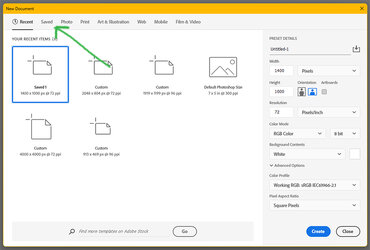
I don't know any way to selectively eliminate the recently used sizes yet if you just click on the "Save" tab where the arrow is pointing is where the your saved presets should be (pretty sure):
Saved-Tab.jpg
 

Back
Top