
What's new
Photoshop Gurus Forum

Welcome to Photoshop Gurus forum. Register a free account today to become a member! It's completely free. Once signed in, you'll enjoy an ad-free experience and be able to participate on this site by adding your own topics and posts, as well as connect with other members through your own private inbox!

Stitching images of rotated object


Gothic_Crown

New Member
Messages
1
Likes
0
I have taken 32 photos of the edge of a coin as it rotates in steps on a motorised turntable.
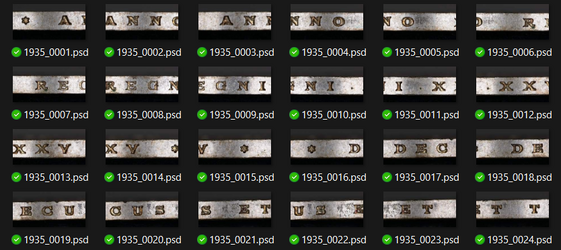
1789279189608.png
I now want to stitch them in Photoshop. I have put them in a stack and can align them manually, but I wondered if it is possible to get Photoshop to do the work automatically. Panorama doesn't seem to work, which is to be expected as it is based on moving the angle of the camera, whereas here the camera is fixed.

Here is the start of my very inexpert attempt at aligning by eye:

1789279535958.png
Any help would be greatly appreciated.
 
I have taken 32 photos of the edge of a coin as it rotates in steps on a motorised turntable.

View attachment 154068
I now want to stitch them in Photoshop. I have put them in a stack and can align them manually, but I wondered if it is possible to get Photoshop to do the work automatically. Panorama doesn't seem to work, which is to be expected as it is based on moving the angle of the camera, whereas here the camera is fixed.

Here is the start of my very inexpert attempt at aligning by eye:

View attachment 154069
Any help would be greatly appreciated.
You are doing a great job, and I know it is tedious. I could not automate it in PS, so one could try AI as well.
The approach I would use is to have them all in their own Layer in Photoshop.
With the first two selected, I would change the upper Layer's blend mode to difference. Then, when moving the image over the other, it is really easy to see when it is aligned. Then turn off difference mode and repeat on the next two layers, etc

One thing I noticed is that not all the side-by-side images are in the correct numeric order. 2 and 3 should be swapped, 17 and 18 should be swapped, and 12 and 22 should be swapped.

Also, I assume you have high-resolution images so you can fine-tune the positioning.

Hope that gives some ideas
John Wheeler
 

Back
Top