What's new
Photoshop Gurus Forum

Welcome to Photoshop Gurus forum. Register a free account today to become a member! It's completely free. Once signed in, you'll enjoy an ad-free experience and be able to participate on this site by adding your own topics and posts, as well as connect with other members through your own private inbox!

Recommendations for new Mac


wjakub

New Member
Messages
3
Likes
0
Hi. I’m looking to upgrade my Mac and am looking for suggestions. I’ve been shooting with a Sony a7R1 (34MP) for years now and will hopefully upgrade eventually to a 61MP version in the future. I stitch images together to create panoramas and mosaics so I’m often working with 1+ Gig file sizes in Photoshop (with layers). Currently, believe it or not, I’m still using a 2010 MacPro w/64Gigs of RAM along with Photoshop CS6. (I never wanted to pay the subscription fee but that will be changing. With such large files is 64 Gig of memory recommended for the M-Series Mac Studio? The new Mac Mini also can be configured with 64 Gigs as well. Do I even need 64Gig? Will 48 Gig work with such large files? Thanks in advance for any information.

Thanks,
Walter
 
Hi @wjakub
One thing to keep in mind is that all Mac models today don't have upgradable memory anymore, so the memory you buy today is the memory you will still have when you retire the machine. So you need to size the unit based on your needs at the end of life.

My 2001 MacBook Pro had a maximum memory of 64 GB, and that is what I got.
M processors end up being more memory-efficient than Intel processors, which helps some.

No matter what you choose, with most any 2026 Mac they are going to feel like a racecar compared to your 2010 Mac Studio
Enjoy your new machine
John Wheeler
 
Hi. I’m looking to upgrade my Mac and am looking for suggestions. I’ve been shooting with a Sony a7R1 (34MP) for years now and will hopefully upgrade eventually to a 61MP version in the future. I stitch images together to create panoramas and mosaics so I’m often working with 1+ Gig file sizes in Photoshop (with layers). Currently, believe it or not, I’m still using a 2010 MacPro w/64Gigs of RAM along with Photoshop CS6. (I never wanted to pay the subscription fee but that will be changing. With such large files is 64 Gig of memory recommended for the M-Series Mac Studio? The new Mac Mini also can be configured with 64 Gigs as well. Do I even need 64Gig? Will 48 Gig work with such large files? Thanks in advance for any information.

Thanks,
Walter
Good point! Since the RAM can't be upgraded do you think 48G is enough or should I bite the bullet for 64?
Thanks!
 
It depends on your usage. I usually have a lot of programs open and working simultaneously on top of PS with a lot of open files

Sitting idle, with no programs open, memory usage shows 19G used
Chrome with a bunch of windows takes up 5G
Adobe Acrobat Pro surprisingly took of 12G
and tons of misc programs, e.g. Preview, Mail, Finder, text edit, financial program, Word, Excel, password manager, messages, Signal, etc

When I first looked at Activity Monitor, it indicated that 50 of 64 GB was used.
So, a pretty good change when I upgrade, I would think long and hard about getting 128 GB instead.

Note: if you have very fast SSD drives, this compensates, as that allows for fast swapping of data and programs to the SSD when needed.

Once in a while, when doing heavy-duty processing, I find that closing some apps helps with speed. Yet, if you are more judicious than I in what you keep open, that 64G may do just fine.

Just some thoughts, and I know this is not a specific answer to your question.

John Wheeler
 
So, a pretty good change when I upgrade, I would think long and hard about getting 128 GB instead.
128gb RAM could get pricey with macs!

My personal opinion, unless you are going to heavily use AI, I think 64gb would be more than adequate, but you can go higher if wanted. I think the processor is more of a consideration than "unified"/RAM.

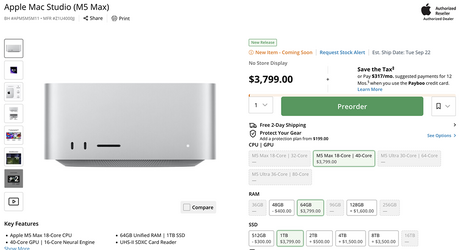
I will be upgrading to a Mac Studio M5 Max...............haven't decided which one yet, but probably 18 to 40 core with 64gb and 1TB SSD. I might save $300 with a smaller 512gb SSD because I have always used external storage. I'm currently using a WD 4TB external.
ScreenShot_02.png

B&H has one of the better price comparison calculators: https://www.bhphotovideo.com/c/product/1997804-REG/apple_ms_m5m_12_mac_studio_m5_max.html

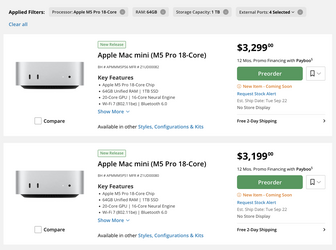
The Mac Mini with comparable features.....
Screen Shot 2026-09-13 at 1.38.56 PM.png

For me, the price difference of $500 is worth the investment so I definitely would go with the Mac Studio with the better processor. But I certainly understand the possible budget constraints. Not to mention that you also have to invest in a great monitor to boot if you don't already have one!
 

Back
Top