What's new
Photoshop Gurus Forum

Welcome to Photoshop Gurus forum. Register a free account today to become a member! It's completely free. Once signed in, you'll enjoy an ad-free experience and be able to participate on this site by adding your own topics and posts, as well as connect with other members through your own private inbox!

Rift Planes of Telara: Planar Tear Help


kekoa

New Member
Messages
3
Likes
0
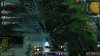
Hi, I am generally new to Photoshop, but do know a decent amount about it. I just seem to not be able to figure this one out though. I am working on a desktop background for my friend with a theme from a mmorpg, Rift: Planes of Telara. In the game there are these tears in the world and above it is a sort of vortex:
2011-02-27_122601.jpg

I am just trying to do the distortion that the vortex creates on the background to look like this but it just wont work. Any ideas on how to do this? Thanks
 
Last edited:
Welcome Kekoa... I'm sure someone here can figure this out.

But that's quite a large image you uploaded there.... better resize it 'n upload again. There are rules here with regards to upload sizes, hope you don't mind.

Quick before the mod squad sees it..... lol....


NAHHHH.... I thinks the size will be OK.....
 
Last edited:
Hi kekoa welcometo the forum

the tool used to create the vortex effect that you are seeking, is"LIQUIFY"
Filter>Liquify


this tool is used to create a large amount of image distortion effects

something like this:
00000_xbox_explosion_no_vortex.png00000_xbox_vortex.png

As you can see i've done this as an example using the liquify filter "Pucker and forward warp tools" adjusting brush size, density, pressure and brush rate to obtain the desired effect.

this may help
A Comprehensive Guide to Photoshop’s Liquify Tool

have fun.
pencil.png
 
Thanks for the help, I guess ill just have to play around for a while to get it right. By the way, did you use the dodge and burn tools to make the warp looked more defined? It looked that way but I am just making sure.
 
Thanks for the help, I guess ill just have to play around for a while to get it right. By the way, did you use the dodge and burn tools to make the warp looked more defined? It looked that way but I am just making sure.
Yes i used some dodge and burn

Also to make waves effect more visible, i used some blurred brush strokes to define the flow
 

Back
Top