What's new
Photoshop Gurus Forum

Welcome to Photoshop Gurus forum. Register a free account today to become a member! It's completely free. Once signed in, you'll enjoy an ad-free experience and be able to participate on this site by adding your own topics and posts, as well as connect with other members through your own private inbox!

Accidentally resized my client work hi-res file to web res. Help me please :( :( :(


1812

New Member
Messages
3
Likes
0
So apparently I did something incredibly stupid and I'm now trying to back peddle the best I can. I've been working on a high-resolution file for a client, it's going to be used in a national advertising campaign, several hours of work has gone into, etc. I could rebuild it, but, again, several hours of work. At some point I sized it down to 72 dpi, 800x1200 px for web resolution and didn't save at the original hi-resolution. This sucks. A lot.

Any solutions here? I still haven't closed the working PSD, but reached the limited of my Step Backwards in History.

I feel so stupid, such a novice mistake. :cry:
 
Re: Accidentally resized my client work hi-res file to web res. Help me please :( :(

Depending on where you saved it last. You may be able to start from a revert point
 
Re: Accidentally resized my client work hi-res file to web res. Help me please :( :(

Just to doublecheck: you saved the 800 x 1200 px version with the exact same filename? No version number or timestamp or anything else different in the filename?

T
 
Last edited:
Re: Accidentally resized my client work hi-res file to web res. Help me please :( :(

Correct. I'm always so good about that too. For some reason I just got sloppy on this one and handled it more casually like it was a personal project for fun. Because it was fun... until I realized the grave mistake I made. Ugh.
 
Re: Accidentally resized my client work hi-res file to web res. Help me please :( :(

1) What OS are you using?

2) Here's a long shot: In almost all large hardware and software engineering, and web design firms where multiple people might be working on the same set of files, the firm sets up an almost-automatic version control system. This is done mostly to prevent two people from modifying the same file at the same time, but it can also be used to reconstruct old builds of software, to explore different branches of the development tree, etc. The easiest thing for it to do is pull up an old version of a file. If, by any chance, you are operating in such an environment or have heard names like "revision control", "configuration management system", "Subversion", SVN, CVS, Git, Mercurial, Bazaar, LibreSource, Monotone, or any of the products in Wikipedia article1 or article2 being discussed in your office, you may be in luck. If this is the case, don't do anything, buy your IT guy a case of the best beer and throw yourself at his feet. ;-)

Unfortunately, my experience is that these systems are not as commonly used with PS because typically, only one designer/artist person needs access to a given set of files at any time.

3) @iDad - I'm with the OP ... what exactly did you mean by "Revert point"? Did you mean a Mac thing like "Time Machine"? Are you referring to a Windows "restore point"? etc.?

Tom
 
Re: Accidentally resized my client work hi-res file to web res. Help me please :( :(

He said his file was still open so possibly he saved it at one point he can revert the file to the last savedpoint is what I mean
 
Re: Accidentally resized my client work hi-res file to web res. Help me please :( :(

@iDad - Ahh, now I understand. Good that you brought this up.

I initially interpreted his 1st post as saying that he reached the limits of his history list, so I assumed that if there were any earlier "saves" in his history list, he would have seen them and tried them. However, upon re-reading his post, I now see that his exact words were that he used "step backwards", and you caught this.

I presumed that since he is working on a national ad campaign, he knows that cntrl-Z in PS doesn't work like it does in most other programs, and that he needs to use either the history panel or at least use Ctrl + Alt + Z:

http://www.tech-recipes.com/rx/25510/adobe-photoshop-enable-multiple-undos/
http://feedback.photoshop.com/photo...esnt_command_control_z_undo_each_history_step


Thanks, Sam.

Tom
 
Re: Accidentally resized my client work hi-res file to web res. Help me please :( :(

Sam?......
 
Re: Accidentally resized my client work hi-res file to web res. Help me please :( :(

Sorry, Dad! This is the sort of thing I do when I'm rushing and type too fast. :cry:

T

PS - I wonder where the OP went.
 
Re: Accidentally resized my client work hi-res file to web res. Help me please :( :(

Is probably still reading your explanation:bustagut:
 
Re: Accidentally resized my client work hi-res file to web res. Help me please :( :(

Overall, that one is on the short side:bustagut:
 
Re: Accidentally resized my client work hi-res file to web res. Help me please :( :(

... so mean, but so true! :cry:

:bustagut: :bustagut: :bustagut:

T
 
Re: Accidentally resized my client work hi-res file to web res. Help me please :( :(

yeah,I am the mean daddy on the forum...... it's too be expect:mrgreen:
 
Re: Accidentally resized my client work hi-res file to web res. Help me please :( :(

Simple solution if I understand correctly..

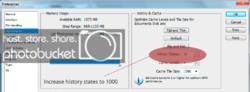
Ps has a default of 20 steps back. So go to...

Edit >> Preferences >> Performance then increase history states to 1000. Just hope it's enough.

History_zpsa5fb23ee.png
 
Re: Accidentally resized my client work hi-res file to web res. Help me please :( :(

Inkz, I'm pretty sure that at the moment, the only thing the OP cares about is finding a here-and-now solution to his current problem.

Reading between the lines, I'm sure it will be a long, long time before this ever happens to him again, whether he ensures this by increasing the number of history states, using the history palette instead of cntrl-Z, incremental named saves, "Time Machine"-like automatic backup systems, a real version control system, or something else.

T
 
Re: Accidentally resized my client work hi-res file to web res. Help me please :( :(

Your at fault! My coffee went up my nose!! :bustagut:Poor OP probably out looking for a new job!:frown:
Is probably still reading your explanation:bustagut:
 
Last edited:
Re: Accidentally resized my client work hi-res file to web res. Help me please :( :(

DIDIDOTHAAAAT?:bustagut:
 
Re: Accidentally resized my client work hi-res file to web res. Help me please :( :(

Just now recovering :cool2: Wonder what happened to the OP??? Must have recovered or left town.
DIDIDOTHAAAAT?:bustagut:
 
Re: Accidentally resized my client work hi-res file to web res. Help me please :( :(

I will no longer use Actions to resave files because of just this thing. Last year I made an action to open the Layered TIF, and Save As a lo res JPG onto the desktop. After running though 20ish files, I notice that 2 of the 20 kept the TIF name, but overwrote the data. One I could pull back from Time Machine (why didnt anyone suggest this to op?), but the last one I had just finished, so no backup. Over the past year I needed to pick up that single file several times. Luckily, no one ever seemed to ask for the high res, only a low res. Go figure.

Oh, or how about the time(s) I thought an entire shoot was backed up, and stupidly deleted the entire 1000-2000 images? Oh, the laughs I had as I was restoring an entire 1TB drive to get back whatever I could.

Good Times.
 

Back
Top