What's new
Photoshop Gurus Forum

Welcome to Photoshop Gurus forum. Register a free account today to become a member! It's completely free. Once signed in, you'll enjoy an ad-free experience and be able to participate on this site by adding your own topics and posts, as well as connect with other members through your own private inbox!

Specific Adding a Passe Partout effect


JohnnyGui

Member
Messages
6
Likes
1
Hello all!

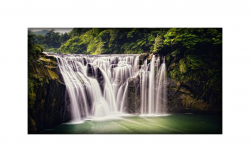
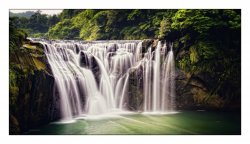
I have a specific request regarding adding an inner shadow border surrounded by white borders to this photo, making it look like a passe partout just like this.

If there are multiple options possible for the inner shadow feature effect, I would like to have it like the following: Shadow angle: 45 degrees, Shadow Size 25%, Shadow Density: 5%, Opacity: 85%.

I would like to have the white borders on each side to be exactly 194 pixels wide. If possible, please keep the quality and the resolution of the photo itself exactly the same (the white borders will obviously increase the resolution 194x2 pixels vertically and horizontally).

I'd appreciate it so much if someone could take the time to do this. Thanks a lot in advance.
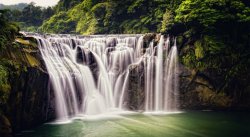
Cropped.jpg
 
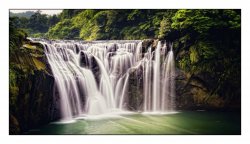
Here is my try at it. The inner shadow feature wont show strongly in your image since the borders are dark as it is.
This can be adjusted very easily if needed
Note that the full image is in a dropbox link below as it wont fit as is due to forum size limitations.
Also note that the white border does not show up with the forum white background yet it is there.
John Wheeler

Here is a 50% size

Defin-adj-50%.png

and here is a link to the full version:

Full Size Version
 
Here is my try at it. The inner shadow feature wont show strongly in your image since the borders are dark as it is.
This can be adjusted very easily if needed
Note that the full image is in a dropbox link below as it wont fit as is due to forum size limitations.
Also note that the white border does not show up with the forum white background yet it is there.
John Wheeler

Here is a 50% size

and here is a link to the full version:

Full Size Version

Thank you so much for your trouble! A few notes if you don't mind:
- I would like to have the wide borders 195 pixels wide on each side, so there'd be 390 pixels extra horizontally and vertically.
- Is it possible to make the shadow length a bit shorter? Making it look as if the white border is closer to the photo itself?
- Could you please use this new resolution photo instead?

Sorry if this would take too much time from you.
 
PSD & PNG = loosless

Thank you again very much, the shadow is perfect now but the resolution doesn't seem to be right. The photo itself is 5120x2774. Including the white borders 195x2 vertically and 195x2 horizontally should give a total resolution of 5510x3164. The attached edit is 5000x2872.

So sorry if I'm asking too much.
 
Hi @JohnnyGui
Had a few more minutes to give it another go. Tried to duplicate the shadow you desired from @[ iLLuSioN ] 's version
Do note that there are many options in Photoshop Layer Styles to do this and they don't have the same type of parameters. There is little to go on what exactly you need in the shadow and the parameters I used have nothing to do with you initial request parameters.

So here is what is posted
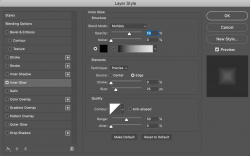
1) The Layer Style settings used to create the shadow (if you want something different these are the ones that will be adjusted)
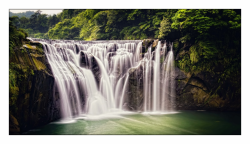
2) The visible image is a JPEG at 50% for viewing as the images over 5000 Pixels are not allowed on the forum
3) I have provided a link to a dropbox image at the size you specified

Hope this does it
John Wheeler

Screen Shot 2021-07-05 at 3.55.08 PM.png

50% JPEG below
Definitief-2-adj.jpg

Link to Dropbox file of full PNG image

Dropbox Link to Full Size PNG
 
Hi @JohnnyGui
Had a few more minutes to give it another go. Tried to duplicate the shadow you desired from @[ iLLuSioN ] 's version
Do note that there are many options in Photoshop Layer Styles to do this and they don't have the same type of parameters. There is little to go on what exactly you need in the shadow and the parameters I used have nothing to do with you initial request parameters.

So here is what is posted
1) The Layer Style settings used to create the shadow (if you want something different these are the ones that will be adjusted)
2) The visible image is a JPEG at 50% for viewing as the images over 5000 Pixels are not allowed on the forum
3) I have provided a link to a dropbox image at the size you specified

Hope this does it
John Wheeler

50% JPEG below


Link to Dropbox file of full PNG image

Dropbox Link to Full Size PNG

Looks like the board software has a limit of 5000px and reduces png files with larger sizes

Thank you both so much! These look perfect, I'm very grateful!
 

Back
Top