Hello, I'm still a little new on the board. I just got Photoshop again and I am very bad and don't know what I'm doing. 
I would like to request someone that is a much better artist then me to make me a background for a website. I'm not allowed to post the link in here but I can show a picture of what the site currently looks like.
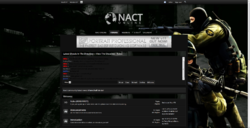
The current back ground I'm using is this.

I like this back ground and want to keep it. I would like more added though. This website plays many different games. So I would like a back ground with a few games in it. The background also needs to stay dark.
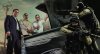
I would like this picture in the top left corner with the men showing but the corners of the picture not showing the R* logo and GTA V logo.

To sum it all up, I would basically like the two pictures to be one picture. This is probably very easy for most of you, If someone could help me out here it would be much appreciated. Thank you.
I would like to request someone that is a much better artist then me to make me a background for a website. I'm not allowed to post the link in here but I can show a picture of what the site currently looks like.
The current back ground I'm using is this.
I like this back ground and want to keep it. I would like more added though. This website plays many different games. So I would like a back ground with a few games in it. The background also needs to stay dark.
I would like this picture in the top left corner with the men showing but the corners of the picture not showing the R* logo and GTA V logo.
To sum it all up, I would basically like the two pictures to be one picture. This is probably very easy for most of you, If someone could help me out here it would be much appreciated. Thank you.