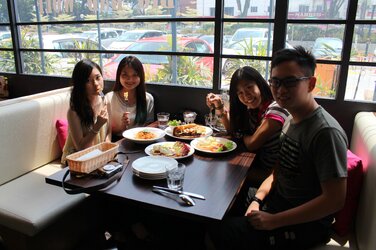
If the image is sufficiently important (ie, newsworthy, one or more subjects are no longer alive, situation will never happen again, etc.) so that one really wants to spend a lot of time repairing the lack of even basic photographic technique, then, of course, one can do a lot with the image.
For example, I ran the image through ACR three times, each with different settings: once for mid-tones, once for the view of the outdoors through the window, and once for the deep shadow areas. Then, using layer masks to select each area, once put in a layer stack within PS, I then did a final tweak of the curves and colors for each area, then combined them using the blend_IF sliders to get nice transitions between the areas.
Below are:
(a) a down sized version of the original so that it can display in-line in the form and will be present should the original on the external site ever be removed; and,
(b) my lightened version.
My tweaks produce an image that has much better tonal balance than the original, but has its own problems. For example,
1. The distribution of light within the scene is not as realistic as if you had lit it properly in the first place. It looks almost HDR-like; and,
2. Trying to pull detail from the deep shadows and the nearly burned out bright areas inevitably introduces ugly artifacts into each area. In this image, This is particularly evident by the dark splotches of noise in the shadow areas of the guy's shirt.
This is why even though one can do a lot in PS, it's always better to get it right (or at least reasonably close) in the camera.
Tom