What's new
Photoshop Gurus Forum

Welcome to Photoshop Gurus forum. Register a free account today to become a member! It's completely free. Once signed in, you'll enjoy an ad-free experience and be able to participate on this site by adding your own topics and posts, as well as connect with other members through your own private inbox!

bevel edges in a texture


Welliam

Member
Messages
23
Likes
0
Hi,
I have this texture and I need to bevel all the edges to the inside. any advise ?

I have CS6 if it can help make things faster.

Thanks
 

Attachments

  • Untitled.jpg
    Untitled.jpg
    63 KB · Views: 50
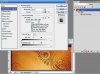
The fast way is to add a BEVEL and EMBOSS layer style to it....

create a layer from the background image and....

experiment with the settings to get the look you need.
 

Attachments

  • bevel.jpg
    bevel.jpg
    84 KB · Views: 49
I think what Welliam is asking is to bevel only the pattern within the image, not the entire thing.

bevel.jpg

If it's like this then you'll either need to select the pattern some how. I did it quickly by using Select - Color Range, but I would recommend using the pen tool for more precision since the colors are very similar.
 
I think what Welliam is asking is to bevel only the pattern within the image, not the entire thing.

View attachment 22329

If it's like this then you'll either need to select the pattern some how. I did it quickly by using Select - Color Range, but I would recommend using the pen tool for more precision since the colors are very similar.

yes this is what mean sorry I was not clear enough

I tried this way and still not accurate enough. but many thanks
 

Back
Top