What's new
Photoshop Gurus Forum

Welcome to Photoshop Gurus forum. Register a free account today to become a member! It's completely free. Once signed in, you'll enjoy an ad-free experience and be able to participate on this site by adding your own topics and posts, as well as connect with other members through your own private inbox!

Brusspup convert photo to dots


Robert68

Member
Messages
7
Likes
0
Hi

I have watched the video from Brusspup (look at youtube Brusspup) how he made a nice artwork using photoshop to convert a photograph to 5 colors and nice dots in rows and colums.

My qquestion:
can anyone tell me how he did this. please, tell me the steps needed to convert a photo to 5 colors and dots.
I will use this for an artwork like Brusspup did, but not with puch pins....

Hope anyone can help me here...

Robert
 
why dont you post an example instead of having us chase you boobtube around?:mrgreen:
 
Ok, i will post an example if i would know how to....
 

Attachments

  • Schermafbeelding 2013-03-21 om 19.58.29.png
    Schermafbeelding 2013-03-21 om 19.58.29.png
    157.8 KB · Views: 38
  • Schermafbeelding 2013-03-21 om 19.58.05.png
    Schermafbeelding 2013-03-21 om 19.58.05.png
    277.9 KB · Views: 43
  • Schermafbeelding 2013-03-21 om 19.59.03.png
    Schermafbeelding 2013-03-21 om 19.59.03.png
    211.1 KB · Views: 43
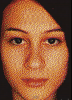
So, he converted the photo to 5 colors: black, white, yellow, red and blue. Then he converted the photo so that each color is represented with a puch pin size...
 
you can do that with a simple pattern overlay and a tweak here and there tweak till your hearts content. I haven't seen the video (YOUTUBE) but that the route I would take.
 
you post a video on how to do it but now you wants steps?
 
Robert, I did watch the video! He did indeed make this using push pins, not Photoshop. A fascinating process with beautiful results I would add.

There are numerous ways to simulate this with PS if that is what you are asking to do. I don't have the time right now, but others like iDad may be able to explain a process (this being Photoshop, you'll find there are multiple methods to achieve this effect, one being add noise as chrisix suggested).

So, stay tuned. I'll find time later this evening, but by then you'll probably have more input.
 
I do not have the pattern of dots but I had this.. what I did was, select the areas i wanted to apply pattern made a blank layer set layer style to place pattern in place (using the selection I choose). I then used a tweak with liquefy just a bit using the pucker tool.
not the same but just to show you it's doable in PS
View attachment 29950
 
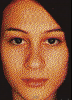
Here's my take on it.

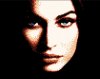
faceoriginal.jpg face.jpg

The way I did this was to first change the resolution of the image to about 100 pixels wide.

Then I increased the contrast about 200%

Then I saved the image as a gif, selecting 8 colors instead of 256.

(of course you can change the variables in any of these steps to your liking).

That's it!
 
Last edited:
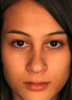
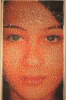
I posted three pictures: one photo of a girl, and a photo which he made in PS. This photo looks like dots... Brusspup used this photo to calculate and make an art with push pins... this is the last picture...

I hope some one can tell me the steps used in PS to create the dots effect.... See picture i will post here

Anyway, thanks for your replies! Nice!

Schermafbeelding 2013-03-21 om 19.58.05.png
 
I posted three pictures: one photo of a girl, and a photo which he made in PS. This photo looks like dots... Brusspup used this photo to calculate and make an art with push pins... this is the last picture...

I hope some one can tell me the steps used in PS to create the dots effect.... See picture i will post here

Anyway, thanks for your replies! Nice!

Did you read my post above? It explains this process exactly!
 
Hi RT

Thanks, you did explain tis proces! Thanks!
Meanwhile i spoke with brusspup... guess what... although in the writings they told he used PS, he in fact used: Spritecraft....

And YES, this works great! Look in google for Spirtecraft!

Everyone here: thanks for you input! I appriciate!!!!

Robert
 

Back
Top