What's new
Photoshop Gurus Forum

Welcome to Photoshop Gurus forum. Register a free account today to become a member! It's completely free. Once signed in, you'll enjoy an ad-free experience and be able to participate on this site by adding your own topics and posts, as well as connect with other members through your own private inbox!

Camera Raw Remove Panel


RayArt

Member
Messages
9
Likes
1
Hi,
I have Camera Raw v17.5 installed but the Remove Panel is missing. I have tried all the suggestion I can find on the 'Net but have not found the answer. The Remove Panel is not showing up any where in Camera Raw. It is not in the Show Panels list. I have Technology Previews checked. Can anyone please help?
 
Do you have Technology Previews checked on the settings panel?

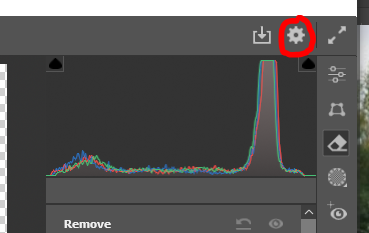
Click on the settings gear icon in the upper right of the Camera Raw panel
1755697082006.png

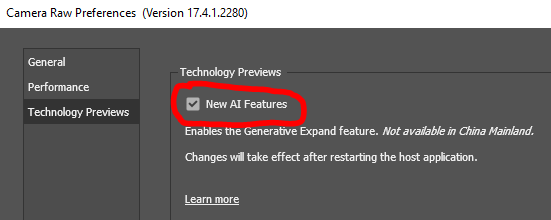
Choose Technology Previews and make sure box is checked next to New AI Features

1755697267340.png

Maybe this will work for you...
 
I ran into the same thing not long ago. The Remove panel only shows up if your GPU supports it and if you’re on the latest update of Camera Raw + Photoshop. Try updating both through Creative Cloud, then restart
 
Thanks folks many thanks for your suggestions but I still have the same problem. I don't have the Remove Panel. I have a very fast recent Intel processor, my tower is only a couple of months old. And I have the Tech Preview switched on. I have Photoshop 26.11 and Beta 27 installed. What could be the reason I don't have the Remove Panel? I also have the same problem with the Adjustment Brush, it's not showing.
 

Back
Top