What's new
Photoshop Gurus Forum

Welcome to Photoshop Gurus forum. Register a free account today to become a member! It's completely free. Once signed in, you'll enjoy an ad-free experience and be able to participate on this site by adding your own topics and posts, as well as connect with other members through your own private inbox!

Specific Can somebody change the ground?


AriaSin

Member
Messages
20
Likes
3
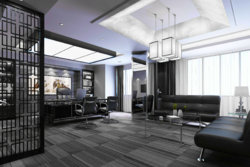
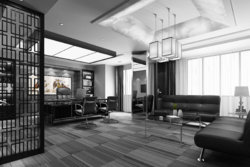
Hello. I need help. I want the brown colors to be black and all the yellowish colors to be white (mainly the ceiling). And I also want the floor to be black and if that's possible instead of black wood more of a black stone or something. I literally want the office to be just black, white, gray (without the plant and picture on the wall)
Thanks!
 

Attachments

  • 1-1F314003436.jpg
    1-1F314003436.jpg
    392.2 KB · Views: 22
  • urban-black-detail.jpg
    urban-black-detail.jpg
    32.2 KB · Views: 20
Last edited:
English isn't my first or second language so it's sometimes hard to describe what I mean but yeah, you did what I wrote but I guess the focus should have been more on the "I want the brown colors to be black and all the yellowish colors to be white". The part you quoted I just wrote to make my request to be easier to understand but I see how it could have done the opposite :D
 
As I already said, no problem, just a bit confusing...:cheesygrin:
I think what he's trying to say is that either:

1 - You didn't darken the browns and didn't lighten the yellows. you just desaturated them, and didn't change their luminosity.

or

2 - He still wanted the blueish tint from the windows to make it still look natural, as natural light always has a blue or yellow tint, depending on the picture.

or both, maybe.
Hope I explained it well.

PS: Upon looking closely, the edges look quite pixelated on your image, compared to the original. check if you aren't using any weird setting or whatnot :D

Cheers!
 

Back
Top