What's new
Photoshop Gurus Forum

Welcome to Photoshop Gurus forum. Register a free account today to become a member! It's completely free. Once signed in, you'll enjoy an ad-free experience and be able to participate on this site by adding your own topics and posts, as well as connect with other members through your own private inbox!

can someone help pls.


stoneman3d

New Member
Messages
3
Likes
0
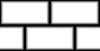
i am trying to make this texture which i will be using as bump map in 3d application . i am trying to make this from past 4 hrs but cant . can someone pls help:cry:BLOCK_BISEL_DISPLACE.jpg
 
* Background black
* Make the base tile grey
* Make a White tile above it smaller in size.
* use the outer glow to match the color of the base tile

Merge all the layers excluding the background layer and you have your tile complete.

Now just copy the tile and place the same in the brick pattern on the black background.

DONE !!!
 
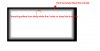
i am using 3dsmax , i applied Gaussian blur to the lower layer which contains the grey rectangle but it blurs from the outside to the inside. i want something that can blur from inside to the outside leaving me with sharp black rectangle on the outside border. BLOCK_BISEL_DISPLACE 2.jpg
 
Try and use Stroke Layer Style for the tiles. Choose Gradient fill type(black to white gradient) with Shape Burst fill style. Find the Size and Position which get the result you need.
 
blocks.jpg:mrgreen:

Four layers three shapes (rounded rectangle tool) filled with white inner bevel to edges lowered opacity
 
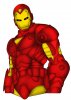
Find an outline of laid bricks and then render with a color of your choice. After which you can add a burn texture along the sides of the bricks and finally use the dodge tool for the center. I have a sample here, but not that of bricks. I used an iron man photo to create the effect.


IRONMAN.jpg
 
Last edited:

Back
Top