What's new
Photoshop Gurus Forum

Welcome to Photoshop Gurus forum. Register a free account today to become a member! It's completely free. Once signed in, you'll enjoy an ad-free experience and be able to participate on this site by adding your own topics and posts, as well as connect with other members through your own private inbox!

Can you delete the standard crop tool presets?


Anthraquinone

Member
Messages
5
Likes
1
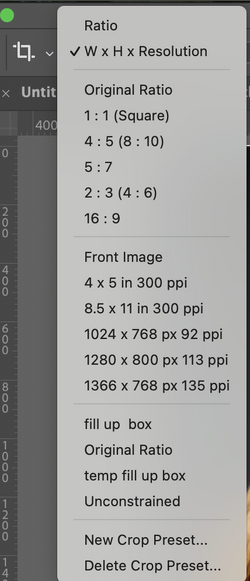
I use various custom crop pre-sets but never the preinstalled ones - they do not suit my needs. Ones like the 1280 by 800 by 113 ppi etc.
I would like to delete these standard ones as they just clutter up the drop down box. I can apparently delete them using the preset manager but they are NOT actually removed from the Crop tool drop down box. Is there any way of doing this.

AQ
 
Hey.

To my knowledge, the built in default presets located in the Crop Tools "Aspect/Ratio/Res" drop down menu located in the tools options bar, can NOT be deleted. You can only delete custom saved (new) presets.
 
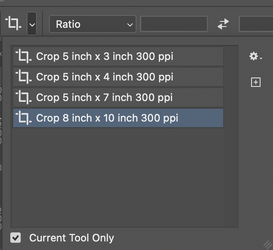
There are two ways of accessing presets. One of them you can fully customize to only the ones you want.

Here is the one that you cannot delete at least some of the options (it shows and start with the word "Raito" at the top.

Screenshot 2026-04-03 at 8.23.08 AM.png

Yet you are in full control of the Presets Panel just to the left (I have it set to just show the presets of the present selected tool):

Screenshot 2026-04-03 at 8.27.14 AM.png

So here is where you can set just the ones you use by creating a preset or delete the ones you want.

Not sure if this solves your particular problem yet wanted to make sure you knew there were two places to access presets.

John Wheeler
 

Back
Top