
What's new
Photoshop Gurus Forum

Welcome to Photoshop Gurus forum. Register a free account today to become a member! It's completely free. Once signed in, you'll enjoy an ad-free experience and be able to participate on this site by adding your own topics and posts, as well as connect with other members through your own private inbox!

Cast shadow


Silenzio

Member
Messages
6
Likes
0
This one shouldn't be too hard, but I really can't figure it out.

I want to make a cast shadow towards bottom right where the bottom of the object isn't flat. I know how to do simple shadows, but not this.


Example pic:
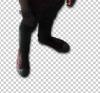
ss (2013-04-19 at 07.40.03).png
(It's rather dark I know; just an example.)

I can't get the feet right in the shadow.
Any tips?

 
Use global light until the shadow falls where you need it....Drop Shadow?
 
you take the shape outline, then transform it to get what you have in your example

you can see the different types of transform at the edit tab
 
Last edited:
Hello,
I to want learn about cast shadows. I'm working with Photoshop 6.0 NOT ESSENTIALS the full Photoshop I've tried to follow the information offered on several How to sites and managed to get a solid black shadow. However the shadow was always in front of the object. Not behind the object. I tried the arrange button to send to back but was unsuccessful. I also tried the Drop Shadow that's built into P S This was hopeless. Can anyone save me with straight simple step by step on how to create a cast shadow.
Thank you :confused:
 

Back
Top