
Photoshop Gurus Forum
Welcome to Photoshop Gurus forum. Register a free account today to become a member! It's completely free. Once signed in, you'll enjoy an ad-free experience and be able to participate on this site by adding your own topics and posts, as well as connect with other members through your own private inbox!
You are using an out of date browser. It may not display this or other websites correctly.
You should upgrade or use an alternative browser.
You should upgrade or use an alternative browser.


Hoogle
Guru
- Messages
- 7,940
- Likes
- 2,488
easiest way to do shadows is duplicate the image you want a shadow of onto a new layer slide the levels to completely make it black use transform controls to position it where you want and then lower the opacity of the level until it matches the other shadows in the picture
Eddie Cook
Active Member
- Messages
- 36
- Likes
- 19
Love the picture.
And thanks for the tip hoogle. I hope I remember that next time I wrestle a shadow.
And thanks for the tip hoogle. I hope I remember that next time I wrestle a shadow.
Hoogle
Guru
- Messages
- 7,940
- Likes
- 2,488
when you say crappy do you mean shape or just the colouring you could try setting the blending mode to multiply or warp it a bit slide the opacity of the layer down along with the fill level upload your psd and I will have a look and see what suits it best in my opinion if you like
Hoogle
Guru
- Messages
- 7,940
- Likes
- 2,488
Ok I dont think you will ever get a good result on this image
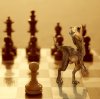
all though your shadow is still underneath all I did was duplicate the camel dino thing flipped vertical then lowered the opacity of the layer and reduced exposure so it was not fully black then applied a small amount of blur and a layer mask to fade it out slightly
all though your shadow is still underneath all I did was duplicate the camel dino thing flipped vertical then lowered the opacity of the layer and reduced exposure so it was not fully black then applied a small amount of blur and a layer mask to fade it out slightly

SeniorS
Guru
- Messages
- 1,517
- Likes
- 452
My try  :
:
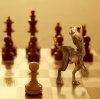
Not perfect too. If i have to make shadow and there it should look like other shadow i try to take color from them and then play with blendings modes, opacity, bluring etc.
This one 2 layers with "brown" colors, one overlay 75% (closest to leg more red) one normal 75%. And gradient to both.
:Not perfect too. If i have to make shadow and there it should look like other shadow i try to take color from them and then play with blendings modes, opacity, bluring etc.
This one 2 layers with "brown" colors, one overlay 75% (closest to leg more red) one normal 75%. And gradient to both.
Last edited:

Toney Park
Member
- Messages
- 20
- Likes
- 0
Great idea and cute dinosaur 

agentmoeller
Guru
- Messages
- 1,349
- Likes
- 1,014
Senior, this shadow looks really good.
I was wondering if there's a filter or some other effect that could mimick that ripple texture that the real shadows have from the chessboard surface. I was thinking of a distort function, but I think the one I'm thinking of is in Illustrator, not Ps.
I was wondering if there's a filter or some other effect that could mimick that ripple texture that the real shadows have from the chessboard surface. I was thinking of a distort function, but I think the one I'm thinking of is in Illustrator, not Ps.
agentmoeller
Guru
- Messages
- 1,349
- Likes
- 1,014
You can try render some Fibers in PS and you it to displace.
I bet that would work!!!