Rarooranya
Member
- Messages
- 12
- Likes
- 0
I think in theory what I want to achieve is pretty simple, but my photoshop skills were fairly average at the best of times and its been a few years since I've done any!
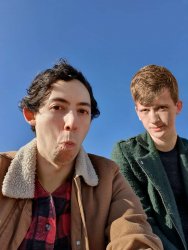
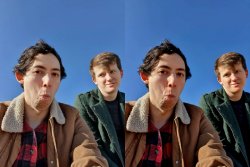
Basically all I want to do is composite two photos together replacing somebody in one with him from another - if that makes sense? The actual masking and rescaling and everything like that I can probably do myself but there's a slight difference in the colour between the two. I've picked two photos with similar lighting (i.e. shadows are approximately the same etc.) but it's just a little too obvious that the two weren't taken at the same time. Not sure if it can really be fixed but I thought if anyone could do it they'll probably be here! Thanks in advance!
Basically all I want to do is composite two photos together replacing somebody in one with him from another - if that makes sense? The actual masking and rescaling and everything like that I can probably do myself but there's a slight difference in the colour between the two. I've picked two photos with similar lighting (i.e. shadows are approximately the same etc.) but it's just a little too obvious that the two weren't taken at the same time. Not sure if it can really be fixed but I thought if anyone could do it they'll probably be here! Thanks in advance!