What's new
Photoshop Gurus Forum

Welcome to Photoshop Gurus forum. Register a free account today to become a member! It's completely free. Once signed in, you'll enjoy an ad-free experience and be able to participate on this site by adding your own topics and posts, as well as connect with other members through your own private inbox!

Create margin (?)


liel33

New Member
Messages
1
Likes
0
Hello,

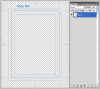
I would like to create margins same as in the attached image (in one layer).
How can I do it in PS CS5?


10x.
 

Attachments

  • ps.gif
    ps.gif
    27.4 KB · Views: 1
1. For the rounded corner rectangle, use the rounded rectangle shape tool set to a path. Then stroke the path.

2. The square corner rectangle, use the rec. marque tool and stroke it.

3. Make a brush for the dotted line (set spacing in the brush palette) and stroke a rectangle shape make as in 2.

4. The others are just plain lines made using the brush. Hold shift key to make them vertical or horizontal.

Do each element on separate layers, you can flatten them later if you wish.
 

Back
Top