What's new
Photoshop Gurus Forum

Welcome to Photoshop Gurus forum. Register a free account today to become a member! It's completely free. Once signed in, you'll enjoy an ad-free experience and be able to participate on this site by adding your own topics and posts, as well as connect with other members through your own private inbox!

Creating spot color


Niels1987

New Member
Messages
3
Likes
0
Hello,

Im very new to Photoshop and PSE and generally only use it to obtain some extra sharpness in my picutures and remove noise. However, with this image I would like to adjust it to black and white except for all the bracelets. I've been trying some different options already (e.g. adding a mask or duplicating the background (in black and white) and erasing the bracelets from this layer) but none of these work very well. The selection that I can make is just not accurate enough for it to be a success. What is the best way to edit my picture?

Thanks in advance,

Niels

P.s. I don't work with photoshop but with Photoshop Elements (v11)
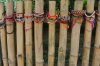
 
This is the image i want to edit. Unfortunatelly I cannot upload the original file location because I am new to the forum and have unsufficient posts to do so.
DSC_1842_zps85a99ceb.jpg
 
Like this? Did this with an adjustment layer- Gradient. Then applied a layer mask and painted into the areas outside the bracelets. That's it, 5 minutes or so.
DSC_1842_zps85a99ceb-2.jpg
 
Hi :)

Yeah thats the idea. Already way more accurate than I could do it. I'll try to do that as well. As the print becomes quite large (A4) it needs to be highly accurate.

Gr Niels
 
Niels, using either the native tools built into PS, or using 3rd party plugins, there are quite a few different methods that, in only a few keystrokes, will automatically select only the brown bamboo, or only the greenery. It's very easy to then Boolean "OR" these two selections together. However, the problem is that these methods will also select anything close to either or those two colors, for example light brown parts of some of the bracelets. Because of this, to do a really good job, one doesn't have much choice but to go in and manually (ie, carefully and tediously) un-select such items so that they remain in full color. This is probably more work than many folks here would care to do gratis / for a demo.

Tom M
 
But worth it and really worth the practice and learning new skills. Try different methods and get into PS when you are able to afford it. You'll be glad you did. In the meantime, practice, patience, and passion is what I always advise.
 
ALBLE said:
That's it, 5 minutes or so.

For you maybe! :) Even with a tablet, it took me over 20 minutes!

You posted before I finished mine but I used the same technique. I used IMAGE > ADJUSTMENTS > BLACK & WHITE to desat my underlying layer.
 

Back
Top