What's new
Photoshop Gurus Forum

Welcome to Photoshop Gurus forum. Register a free account today to become a member! It's completely free. Once signed in, you'll enjoy an ad-free experience and be able to participate on this site by adding your own topics and posts, as well as connect with other members through your own private inbox!

Dust and spots on a Service Manual pages


softwarelover

Member
Messages
5
Likes
0
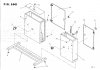
I have already scanned technical drawings with dust speckles seen below. The original manual is not available unfortunately.
page.jpg

I have used the Photoshop CS6 Dust and Scratch Removal filter, but it affects the drawings even the radius is 1. Higher threshold doesn't help either. When I used the filter twice all the dust are gone but the drawings are damaged. I have also used some batch software without success.
Is there any good automated way to remove them without affecting the original drawings? It has 53 pages :sad:.
Thank you very much for all your advices!
 
There are many people here that are better than I am, but I tried duplicating the layer and changing the blend mode of the new layer to screen mode. It helped some. Now maybe someone else can come by and show us both how it is correctly done :wink:
 
Put a layer of white under the image and erase the unwanted areas ....Done
BE SURE TO DUPLICATE YOUR ORIGINAL

there are other ways but that's simple to explain ;)
 
Last edited:
iDad, I was actually working on this using that same technique (I'm bored)

I am using the Polygonal Lasso tool to delete large areas.
 
I suspect what you are referring to as dust specs is actually some bleed through from the back of the scanned page. Dust specks etc would be much more random in nature. The specs you have are pretty geometric. Can you try adjusting the scanner to hopefully give you a cleaner image?

I also recall that I have used a high end photocopier/scanner that was able to make clean copies from pages that had darkened (aged brown) and dirty/discoloured pages. The sort of copier that you would find in a larger copy centre such as a Kinkos/FedX store (at least thats where I found the one I am thinking about). Not nec the ones the public has access to but these may work, but the big ones behind the counter. You may be able to make clean photocopies and then scan them into your PC (or, you probably could get the copy centre to scan them into digital format for you saving you a lot of time and work).

Short of this I think you will have to clean all 50 or so pages manually. I do not think any algorithm will be able to distinguish between the light grey pixels outside of the drawn lines from those that are part of the line.

I hope this helps
 
Last edited:

Back
Top