
Photoshop Gurus Forum
Welcome to Photoshop Gurus forum. Register a free account today to become a member! It's completely free. Once signed in, you'll enjoy an ad-free experience and be able to participate on this site by adding your own topics and posts, as well as connect with other members through your own private inbox!
You are using an out of date browser. It may not display this or other websites correctly.
You should upgrade or use an alternative browser.
You should upgrade or use an alternative browser.
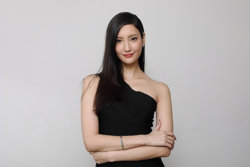
Specific Enlarge this picture to 3840 x 2160 resolution in high quality
- Thread starter akenology
- Start date


As long it's not losing too much quality then it's okay. I would like to see the resultMuch can be done with Photoshop, but it's not magic. The image can be enlarged, but it's not gonna look good.
- Messages
- 3,383
- Likes
- 3,112
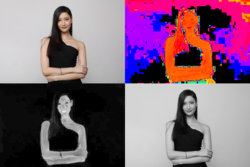
I can run it through a couple tools yet do you have a version of the image that is not at such a high compression level of JPEG? To show the issue I have extracted in clockwise fashion the Hue component, luminosity component, and saturation component. Hue and Sat are already quite off and lots of compression artifacts.
Will do best if you don' have a better original.
John Wheeler
Will do best if you don' have a better original.
John Wheeler
Last edited:
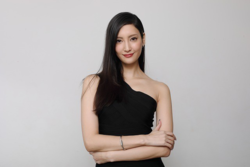
How about this? I've converted the previous picture from JPG to PNG. Will that help?I can run it through a couple tools yet do you have a version of the image that is not at such a high compression level of JPEG? To show the issue I have extracted in clockwise fashion the Hue component, luminosity component, and saturation component. Hue and Sat are already quite off and lots of compression artifacts.
Will do best if you don' have a better original.
John Wheeler
- Messages
- 3,383
- Likes
- 3,112
No, all the aritfacts just carry over to the PNG. You would have to start from a better original. You may not have that I understand. Also, if you wanted a 6X on both dimensions, that would be 3840x2556. I will give it a go as others have already
Ah, my bad. Indeed, I only have the previous picture one as the original sourceNo, all the aritfacts just carry over to the PNG. You would have to start from a better original. You may not have that I understand. Also, if you wanted a 6X on both dimensions, that would be 3840x2556. I will give it a go as others have already
- Messages
- 3,383
- Likes
- 3,112
OK, this is the best I can do on relatively short order with the tools I have on hand.
Hope this helps whatever you are trying to do.
John Wheeler

Hope this helps whatever you are trying to do.
John Wheeler
 )or what you did... but there is something wrong with your try Thebestcpu...is worst than the simple enlargement in photoshop (what i did)
- Messages
- 3,383
- Likes
- 3,112
Totally agree with your assessment Argos and yes I threw the compressed JPEG through JPEG>raw and also Gigapixel. It does not always gives great results espeically with body parts. Good demonstration of the limitation of those tools (or of the pilot  )
)
)