

NamanyayG
Well-Known Member
- Messages
- 81
- Likes
- 8
Hi there gurus!
Needing your help.
See this image
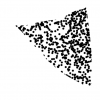
I made a crude selection of a triangle, and filled it in with circles
As you can see, some of them are not full circles, they are being cut because of the edge.
I was wondering, if there is a way that the circles do not cutoff.
A good example would be those colorblind test images, which have circles filled with circles, and the inner circles do not "cut off"
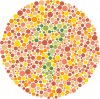
So, what I want is that I make a selection, and fill it in with a pattern of a shape (whether it be circle, square, or something else) and that isn't being cut off by the edge.
Thanks in advance gurus.
Needing your help.
See this image
I made a crude selection of a triangle, and filled it in with circles
As you can see, some of them are not full circles, they are being cut because of the edge.
I was wondering, if there is a way that the circles do not cutoff.
A good example would be those colorblind test images, which have circles filled with circles, and the inner circles do not "cut off"
So, what I want is that I make a selection, and fill it in with a pattern of a shape (whether it be circle, square, or something else) and that isn't being cut off by the edge.
Thanks in advance gurus.


