What's new
Photoshop Gurus Forum

Welcome to Photoshop Gurus forum. Register a free account today to become a member! It's completely free. Once signed in, you'll enjoy an ad-free experience and be able to participate on this site by adding your own topics and posts, as well as connect with other members through your own private inbox!

Illustrator Gallery Vector


SPWA

Power User
Messages
445
Likes
298
I wanted a room as a background but stock just wasn't right. I had a look around google, and saw some vectored rooms, and I wanted to achieve that myself. I still need to add some lights, and other objects, maybe replace the canvas's with different things. This is what I got so far, and it's 100% scaleable Vector.
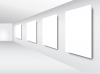
walls-01.png
 
Looks good. Now you have to look for a suitable carpet , wall texture (wood) , and ceiling fixtures.

Maybe add a column at wall centre?
 
yeah, I'm trying to do lights at the moment, but I wanted it to be completely Ai. I'm trying to add one of those round sunk-in spotlights in the ceiling above each canvas. Can't find a tut on it, so just seeing what works at the moment.

The column is an interesting idea, shouldn't be too hard to vector a decent looking one. Texture's on the panels is a different matter. Not sure how I'd get that 100% scaleable.. but I do like a challenge :)
 
Once you've completed the scene, you may be able to do texture map in AI. Or combine work with PS...... a lot of masks may be involved in this.

Lighting or atmosphere effects may require PS.
 
Just curious why you made the width of the room so tight. It feels a bit claustrophobic to me.
 
I was too focused on trying to work out the canvas perspective, and meshing the gradient so it follows the perspective of the wall, I didn't think too much about that. I ideally want the same wall on the other side, & the back wall to look as though there is a T junction. I should probably make those changes sooner rather than later.

I agree on adding atmosphere to the room would be best done in PS. Maybe the goal of 100% vector was a tad too high.

I will alter the room shape 1st, & go from there.
 
Adding atmosphere is a great idea. Just keep.posting your changes. It's a very interesting project. I could help you out and put some of my art on the canvases, if you wish.
 
That would be awesome. The mesh tool takes me longer than I'd like, but I'm almost done with the new room layout.
 
I like it. Great possibilities as an image or a showroom template.

Now about adding a column... lol. Lacks a column.
 
:) I had 2 things on my list of additions, one was Pinlights, and the 2nd was benches. I have added column to the list, I just hope I can get it to look correct perspective wise.
 
Looks to me that's another corridor at the end of SPWA's POV. A different look to a common gallery scene.
 
Yes, it is meant to be another corridor. The 1st try had the back wall like Chris suggested, but then I changed it to be more open, so if it was to be used as a showcase, you have the impression there is more to see down that corridor.

I wanted to use the room originally to be backdrop for a Smart Object Template, but I will have to test it, as it may not work as intended, but better as just a Gallery.
 
Lights & Bench added. My experience level is kicking in now. I am struggling with the Light that the pinlights should throw down the wall, and the shadow for the benches. Not really sure how to get them to look right, that's why they are not there currently.

Gallery.png
 
Looking good.

Shadows come in later after you add in textures and other image components. Only then you'll know what light and shadow intensity you need to add in for more depth and realism.
 
The Gallery Walls, Floor & Canvas's are now editable Smart objects. The original white layers are still there, so you can either show them or use them for shading on the Smart Object Layer. Extra effect & Shadow added to the Benches, & the shadow is on it's own layer so that it can be altered without altering the bench.

2 places for possible logo locations, & optional page buttons also added. The pin lights still have no bulbs in them though. :)

Custom-Gallery.png

I can host the file for download if anyone would like to have a play with it. Just let me know & I'll post a link.
 

Back
Top