What's new
Photoshop Gurus Forum

Welcome to Photoshop Gurus forum. Register a free account today to become a member! It's completely free. Once signed in, you'll enjoy an ad-free experience and be able to participate on this site by adding your own topics and posts, as well as connect with other members through your own private inbox!

General questions, some help with my cd cover


Bruno Fey

Banned
Messages
3
Likes
0
Hey guys! So, i have a band and we wanna do a ep cover, and i'm the one in charge, but i have no freaking ideia how to. I already have photoshop cs5, but no clue how to create some kind of awesome cover. Our idea is: The name of the band, on the beach, with the backgroung with some kind of effects, cool effects. Like this one: 7065863.jpg
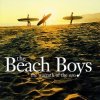
So... I wanna know how to put letters(text, problably) with high resolution and stuff. You guys problably know better then me what i need. Stand by for answer's. Thanks!
 
Hey Bruno, since, by your own admittance, you don't know what your doing, then you have two basic options. You can pay someone to do it for you or you can gather up all YOUR ideas, images, text, etc;............ and we can help you step by step!

If you choose the latter, then post all the images you want to use for your cover (watch your copyrights) and someone will help you with the effects and text.

If you would rather someone else do it for you, here are the instructions for requesting a freelance job http://www.photoshopgurus.com/forum...-posting-freelance-job-please-read-first.html
 
Let me add to what Sam just said: My experience is that it takes someone at least a couple of weeks of intensive playing around with Photoshop for them to reach even the most minimal level of competence (understand some of the basic terminolory, know how to open and (appropriately) save files, etc.); months to get to the point where they can turn their simplest ideas into Photoshop designs; and, years to get to the point where they can translate most graphic ideas into actual PS designs, know the best tools to use, etc.

This the reason people pay graphic artists / designers. Given you said that you are starting from essentially zero and all you really have is a copy of the program, if this project is at all serious, I strongly suggest you hire someone to do it for you.

FYI, the suggested rates here on Photoshop Gurus are absurdly low compared to real-world design rates - look at the article cited by Sam.

In contrast, if you go the other route -- ie, trying to do it yourself, having constant hand-holding, etc. -- it is *exactly* analogous to a guy posting a notice on a music forum that says: "Need people to help me compose and learn to play awesome songs. I own a guitar but have never picked it up and don't have a clue as to where to start."

Just my $0.02,

Tom
 
Hear! Hear! Big round of applause!:thumbsup:
Let me add to what Sam just said: My experience is that it takes someone at least a couple of weeks of intensive playing around with Photoshop for them to reach even the most minimal level of competence (understand some of the basic terminolory, know how to open and (appropriately) save files, etc.); months to get to the point where they can turn their simplest ideas into Photoshop designs; and, years to get to the point where they can translate most graphic ideas into actual PS designs, know the best tools to use, etc.

This the reason people pay graphic artists / designers. Given you said that you are starting from essentially zero and all you really have is a copy of the program, if this project is at all serious, I strongly suggest you hire someone to do it for you.

FYI, the suggested rates here on Photoshop Gurus are absurdly low compared to real-world design rates - look at the article cited by Sam.

In contrast, if you go the other route -- ie, trying to do it yourself, having constant hand-holding, etc. -- it is *exactly* analogous to a guy posting a notice on a music forum that says: "Need people to help me compose and learn to play awesome songs. I own a guitar but have never picked it up and don't have a clue as to where to start."

Just my $0.02,

Tom
 

Thanks, that's sick! Loving it, using it already, or trying too.

Hey Bruno, since, by your own admittance, you don't know what your doing, then you have two basic options. You can pay someone to do it for you or you can gather up all YOUR ideas, images, text, etc;............ and we can help you step by step!

If you choose the latter, then post all the images you want to use for your cover (watch your copyrights) and someone will help you with the effects and text.

If you would rather someone else do it for you, here are the instructions for requesting a freelance job

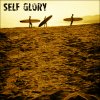
Thanks for all the info! I saw like... 4 hours of video last night. Well, some stuff came out, being this: Self Glory.jpg
Pretty cool, hu? I'm loving actually. Gonna try with some other pics that belong to me, so i won't get f***** by copyrights. Thanks for all the replys guys.
 
Great stuff man! I actually was looking for something more like a tutor thing, so when something too weird pop's up and i have no idea how to do it, you guys come in, you know? Don't wanna be a pain in the ass, i just want some light on my head when get's dark with my dumbness. hahaha i hope you understood, sorry for my bad english, i'm from brazil. Thanks anyway, and see my first photoshop down here, if you liked, tell me. Will be good for me and to boost my desire to learn more and improve my skills.
 
Hi , Bruno.

That's what we're here for - to help hobbyists or aspiring designers learn Photoshop. But depending on the hour of the day and who's online, you may have to wait for a response. Don't hesitate in posting your queries to problems or more info.

I see you've used the clone tool or copied paste/blended the image to replace the text area. That's a good start in learning the uses of PS's capabilities. Try adding some text of your band's name.

It would be a good idea to start creating your band's cover image with a "safe" image as you go along through the learning curve. (copyright free or personal photo image). Just remember to save the file in a different name so you don't overwrite the original image. And to save multiple copy versions in case you don't like what you created. This way you can open a version of what you like in previous versions.

And post your creations that way we can help you out with improvements or such....

Cheers..
 

Back
Top