What's new
Photoshop Gurus Forum

Welcome to Photoshop Gurus forum. Register a free account today to become a member! It's completely free. Once signed in, you'll enjoy an ad-free experience and be able to participate on this site by adding your own topics and posts, as well as connect with other members through your own private inbox!

Gorilla with a Human face .. ;P


ArgamanZa

Member
Messages
11
Likes
2
Hey,
i know it's too general but basically i want to merge two pictures,
some kind of Ape/Gorilla with a human face,
I'm trying to do this for the last 2 days and i just can't find the technique to make it both
understandable (keep the face recognizable) and still Authentic (It'll really look like it's a gorilla with a human face)
I'm looking for some kind of a guide or even a tip about the right technique.
Thanks!
 
simplist way i would do it lasso around the human face copy/paste it over the Ape face and erase the edges leaving the main features eg.. eye,mouth,nostrils (not the whole nose)
make sure you have a low hardness on the eraser

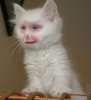
here is an image i did using that method

dearna_Cat.jpg
 
Last edited:
sorry I made a language mistake and I don't know how can I fix it!
Anyway if you use photoshop, just find the photos (maybe you've got them) that have similar rotation to have a better effect, then you have to create a mask on the Ape layer, the human face layer must be under. Then use the brash tool with the black color and begin to drow on the mask Ape level. that's all, I would like to use a images example but at the moment I have no time.
 
I posted a gorilla with human face somewhere here
 
the problem is after i did that, and did it pretty well in my opinion, the human's face is almost unrecognizable ...
I mean, if I'll show the picture to someone without telling him who's those face are he won't ever know...
 

Back
Top