
Photoshop Gurus Forum
Welcome to Photoshop Gurus forum. Register a free account today to become a member! It's completely free. Once signed in, you'll enjoy an ad-free experience and be able to participate on this site by adding your own topics and posts, as well as connect with other members through your own private inbox!
You are using an out of date browser. It may not display this or other websites correctly.
You should upgrade or use an alternative browser.
You should upgrade or use an alternative browser.
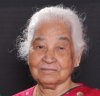
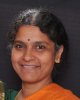
hai can some one remove the background from these two images
- Thread starter dhfxxx
- Start date



$1r_M4x1mu$
Guru
- Messages
- 1,487
- Likes
- 294
Re: Request
no worries, it's always good to go to the introductions forum section first, there you can say hi and you can ask about how we work on these forums.
and i can try, but it will be a while i'm back in school tomorrow so i have less time on my hands if i don't get around to it i know a few people who will
no worries, it's always good to go to the introductions forum section first, there you can say hi and you can ask about how we work on these forums.
and i can try, but it will be a while i'm back in school tomorrow so i have less time on my hands if i don't get around to it i know a few people who will
Hi dhfxxx
I've moved you request to a new thread, this way will be more noticeable to most of our members and you will get more help as well
thank you very much.........

Stric9
Power User
- Messages
- 431
- Likes
- 191
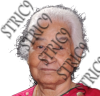
background is showing through the hair, if dark background this will work, if light background some dodging is in order.
You can learn how to do this by searching channel based selections or selecting hair.
The other picture will be much more time consuming since the background and hair blend together much more. May I ask what are these for and is there some reason that I should spend my time doing the other one?
background is showing through the hair, if dark background this will work, if light background some dodging is in order.
You can learn how to do this by searching channel based selections or selecting hair.
The other picture will be much more time consuming since the background and hair blend together much more. May I ask what are these for and is there some reason that I should spend my time doing the other one?
Thanks for your reply to my post, well the pictures were my mom's and my grandma, i edited myself the remaining images only these two were complicated and i cannot achieve the correct result....actually they were for the albums to be created for their 60th wedding anniversary....it will be of great help if you edit hem for me.....
thank you
Stric9
Power User
- Messages
- 431
- Likes
- 191
Here is how to do what I did. Open the file of your grandma. Go to the channels pallet. copy the Green Channel. Paint everything white on you grandma up to the edges of her hair. Don't get carried away with the edges just yet. Paint the background black. Don't worry around her hair yet either. 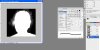 Pick up the Dodge tool. Dodge her hair while on the highlights setting with an exposure of around five. This will give you a nice controlled way to lighten her hair. Grab the burn tool and burn the background around her hair set to shadows and about 5 exposure. Repeat as needed. You can also use the brush tool in overlay mode painting with black and white but I think the dodge/burn tool give you more control since you can select shadow/midtones/highlights and the exposure.

Cntl+M for a curves adjustment>strong contrast

Go back to the dodge and burn, turn the exposure up to 15 and dodge then burn.
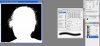
Put the brush tool in overlay mode. Paint over with white.
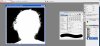
Back to dodge and burn turn exposure up to 40

Cntrl+L for level adjustment I used these values. 11, 1.68, 208

Now cntrl click your alpha channel to select it, Alt double click the layer icon in the layers pallet, cntrl j to copy selection to a new layer and hide the background. This is similar to what you should get - the Watermark.

Finally with dodge tool set at 13 altnernate dodging the shadows and midtones till you get something like this.
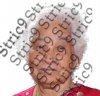
Repeat till you get desired effect. This will depend upon the background it goes upon. To help it blend better, if it is a dark background, duplicate your grandma's layer and the one on the bottom set to multiply, if light background set it to screen.
Hope this helps. We are here to help not to do free projects for people.
You can apply this same technique to your moms picture how ever it will take smaller steps and it will be much more difficult since her hair blends into the background better.
Pick up the Dodge tool. Dodge her hair while on the highlights setting with an exposure of around five. This will give you a nice controlled way to lighten her hair. Grab the burn tool and burn the background around her hair set to shadows and about 5 exposure. Repeat as needed. You can also use the brush tool in overlay mode painting with black and white but I think the dodge/burn tool give you more control since you can select shadow/midtones/highlights and the exposure. Cntl+M for a curves adjustment>strong contrast
Go back to the dodge and burn, turn the exposure up to 15 and dodge then burn.
Put the brush tool in overlay mode. Paint over with white.
Back to dodge and burn turn exposure up to 40
Cntrl+L for level adjustment I used these values. 11, 1.68, 208
Now cntrl click your alpha channel to select it, Alt double click the layer icon in the layers pallet, cntrl j to copy selection to a new layer and hide the background. This is similar to what you should get - the Watermark.
Finally with dodge tool set at 13 altnernate dodging the shadows and midtones till you get something like this.
Repeat till you get desired effect. This will depend upon the background it goes upon. To help it blend better, if it is a dark background, duplicate your grandma's layer and the one on the bottom set to multiply, if light background set it to screen.
Hope this helps. We are here to help not to do free projects for people.
You can apply this same technique to your moms picture how ever it will take smaller steps and it will be much more difficult since her hair blends into the background better.
Last edited:
Here is how to do what I did. Open the file of your grandma. Go to the channels pallet. copy the Green Channel. Paint everything white on you grandma up to the edges of her hair. chnique to your moms picture how ever it will take smaller steps and it will be much more difficult since her hair blends into the background better.
thank you very much and i got the result following your guidelines....is there any thing about my mom's picture, because with the same steps the black and white cannot be distinguished..
thanks once again for the great help.
Stric9
Power User
- Messages
- 431
- Likes
- 191
Not having too much luck with it since the backgrounds are so similiar you may have to use the pentool or quick mask and paint you a mask. The principles in the previous few post work somewhat but its not as good for this picture. Just not enough contrast between the hair and background. Another pic you can select by chance?
Last edited:
Not having too much luck with it since the backgrounds are so similiar you may have to use the pentool or quick mask and paint you a mask. The principles in the previous few post work somewhat but its not as good for this picture. Just not enough contrast between the hair and background. Another pic you can select by chance?
sorry bro its the only only picture i got.....any way thanks a lot for your help,i didn't thought some one will take the work seriously and do, and i am so happy about your guidance and spending time for me....thanks once again.

