basically i have the need to create a wallpaper, i haven't done one in some time, not a decent one anyway. and I'm having some slight trouble.
I Have this image so far:
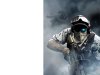
and i need the background area behind the soldiers to span across the whole canvas, creating a gradient and adding the smoke in will take ages and it probably wont look as good as hoped. my clone brush tool doesn't work because of a thing ubuntu has with the alt key, it stops me defining a source point the healing brush gets nowhere but where the Pixels are already not beyond. so as you can guess I'm kind of stuck.
I'm currently contemplating grabbing the end witht the select, duplicating it and blurring it, whether or not it looks daft is another matter.
i need a way of spanning it across without it looking odd or stupid. can anyone recommend anything?
If you need the .psd, i'll happily upload it for you.
I Have this image so far:
and i need the background area behind the soldiers to span across the whole canvas, creating a gradient and adding the smoke in will take ages and it probably wont look as good as hoped. my clone brush tool doesn't work because of a thing ubuntu has with the alt key, it stops me defining a source point the healing brush gets nowhere but where the Pixels are already not beyond. so as you can guess I'm kind of stuck.
I'm currently contemplating grabbing the end witht the select, duplicating it and blurring it, whether or not it looks daft is another matter.
i need a way of spanning it across without it looking odd or stupid. can anyone recommend anything?
If you need the .psd, i'll happily upload it for you.