Photoshop Gurus Forum
Welcome to Photoshop Gurus forum. Register a free account today to become a member! It's completely free. Once signed in, you'll enjoy an ad-free experience and be able to participate on this site by adding your own topics and posts, as well as connect with other members through your own private inbox!
You are using an out of date browser. It may not display this or other websites correctly.
You should upgrade or use an alternative browser.
You should upgrade or use an alternative browser.
Help me with this effect please!!
- Thread starter Simonfol
- Start date
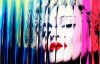
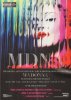
HiSurfing on the web i found the Madonna's 2012 world tour poster, I like very much the effect but i'm not be' able to recreate it. Can anyone teach me how to do?
Thank you so much
Sorry for english i'm an italian student
Hi, is this the poster you are referring to?

If so I would imagine some sort of sketching filter would work nicely. Hope that helps. I am a noob to photoshop so if I am wrong don't hold it against me.


ibclare
Queen Bee
- Messages
- 9,890
- Likes
- 4,028
I tried doing it with threshold and desaturated everything, played around painting the mask effects, then applied a hue/sat adjustment area and used the mask to reveal the grey leaving the hair maroon colored. I painted a blue layer on top of the highlights and changed it to color. There are always multiple ways to do most effects in PS.
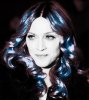
I did this for quick not quality
I did this for quick not quality
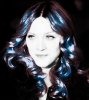
Here is what I did to a pic of myself.
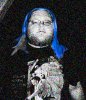
I copied my hair as a new layer and then made the picture black and white then put my hair back on and changed the hue to blue and then added a grainy texture to the picture. Amateur, I know, but as most of you know Im still learning.
I copied my hair as a new layer and then made the picture black and white then put my hair back on and changed the hue to blue and then added a grainy texture to the picture. Amateur, I know, but as most of you know Im still learning.

Dataflow
Power User
- Messages
- 484
- Likes
- 195
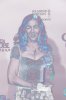
to get close
first duplicate the original layer.
then invert that layer (from the "Image" menu)
change the blend mode to "lighten"
Desaturate the original layer and then add some red and blue back into the layer using "Color Balance" to give that purple color
first duplicate the original layer.
then invert that layer (from the "Image" menu)
change the blend mode to "lighten"
Desaturate the original layer and then add some red and blue back into the layer using "Color Balance" to give that purple color