What's new
Photoshop Gurus Forum

Welcome to Photoshop Gurus forum. Register a free account today to become a member! It's completely free. Once signed in, you'll enjoy an ad-free experience and be able to participate on this site by adding your own topics and posts, as well as connect with other members through your own private inbox!

Help needed creating small box with inside border


lemonpixel

Member
Messages
9
Likes
0
Hi,

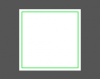
I am trying to create this:

transparent background
white square 80px x 80px
(box will eventually be added over a coloured background)
inside white box should be a thin boarder of #F47421 and then white in the middle.

So white outside box 3px, then an inside border of 3px #F47421 and then the middle is white also.

I just can't get it to work. Any help would be greatly appreciated.

Thank you.
 
Create a new document at 80px x 80px, resolution 72 ppi, RGB, background: transparent. Fill Layer 1 with white. Make new layer. Select All (cmd-A). Edit>Stroke: Width=3px; Color=White; Location=inside. Select the layer with the 3px border by holding CMD and clicking in the layer (or you could use Select>Load Selection... and choose your layer from the list). Invert your selection (SHFT-CMD-I) and Edit>Stroke again but with the color #F47421. Now Merge Visible (SHFT-CMD-E) and you're done.
 
Is this what you are after

Untitled-1.png

if so select the square marquee tool and select fixed size and set it to 80px X 80 px
then use the paintbucket tool to fill with white

then go back to the marquee tool You should still have an active selection
go to select>modify > contract and type in 3 px

inside your box and with the marquee tool selected right click and select stroke path
my example i used the settings of 1 px width and a green colour.

Job done
 

Back
Top