
What's new
Photoshop Gurus Forum

Welcome to Photoshop Gurus forum. Register a free account today to become a member! It's completely free. Once signed in, you'll enjoy an ad-free experience and be able to participate on this site by adding your own topics and posts, as well as connect with other members through your own private inbox!

Help with making this text


Sean Long

New Member
Messages
2
Likes
0
Hello, I'm new to the forum so hopefully this is the correct place for this! I saw this flyer and was wondering how to do "the hardcore takeover" style writing that's done in this image. I've been trying my hardest to do this but don't have a clue how they have done it???

Sorry it's an attachment I haven't posted enough to post links.
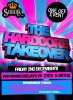
swank.jpg
 
that kind of looks like the "now thats what i call" music cd covers haha...no but in truth im not so great at photoshop so idk if id be of much help but good luck!
 
a lots of tutorials from the net dude,, like this one, I know this is not exactly what you are looking for but I think this would help you to have an idea...
Code:
vandelaydesign.com/blog/design/3d-photoshop-text-effects/
 
I believe this would of been done in Illustrator, though if you find out what font that writing is, you could replicate it by doing 3D text on top of 3D text.
3D text tutorial.
Fonts
I must say that I really hate it when happy gets missed out from songs that are not just hardcore, also DJ's are still making money from playing exactly the same songs in the same order as what they did in the late 80's early 90's. Them DJ names are a bit pants as well.
View attachment 10889
 
Last edited:
Ha ha! I'm not attending the event... it's not my scene! I just really wanted to know how to make that 3d effect. The font looks like Ariel to me but thanks for the reply and example!
 

Back
Top