What's new
Photoshop Gurus Forum

Welcome to Photoshop Gurus forum. Register a free account today to become a member! It's completely free. Once signed in, you'll enjoy an ad-free experience and be able to participate on this site by adding your own topics and posts, as well as connect with other members through your own private inbox!

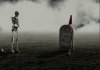
Hole In One


Like it a lot, very nicely done. I had to search for the grave name ( I'm not a golf suporter XD)

Cheers!
 
Last edited:
Thanks. I'm not a golf fan eighter so I had to look up an old deceased one...:cheesygrin:
 
Nicely done, Eggy! But I guess he's not gonna make par....
 
No Jerry, as long the owner of that patch of ground is holding him back he's gonna bogey many times again and again...:biglaff:
 
Wow... another excellent composite to add to your "dark series".
As always I really like the small details that tell a story and I'm fascinated how you manage to create this eerie mood in your image.
:thumbsup:
 
Thanks Chris.
A bit of 'dark' humor isn't gonna kill anyone...:biglaff:

A started with a black canvas 'original is 5000 X 3500 px)
On top of that I applied a 'fog' brush in big size and somewhat greyish.
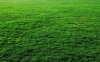
Then I opened the grass layer and squeezed it vertically to 3/4 of the canvas and applied a gradient black to transparant to make the grass and the misty background fluent.
I reduced the saturation much.
That's for the basic work.
Then I started playing with the Pixelsquid objects, adding a black color adjustment layer over them and brush away the light parts ect...
Added the shadows, dodging and/or burning and made a composite snapshot, level adjustment and camera raw filters and voila...
 

Back
Top