Kayasha
Member
- Messages
- 5
- Likes
- 0
Hi all! I'm new here. I currently design book covers and web sites and am new to PhotoShop but loving it.
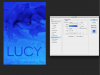
I was wondering if anyone could give me some advice on how to achieve this look - this kinda blue-ish hue?

And this one:

The second has kind of a beige-ish texture.
I have been playing with texture overlays but I'm not really getting this same effect. If anyone could point me in the right direction of may be a tutorial, I would be very grateful!
Also, this is probably the stupidest question in the history of this forum, but I used to design all my web graphics in PaintShop Pro (don't laugh at me!). Now, however, I am working solely in PhotoShop CS6. When I design web graphics, they look small in PhotoShop but huge on the web. I am designing at 72dpi. Does anyone know why they look so small in PS, even at 100%, than they do online? They also look a little blurry online. Not sure what I am doing wrong here and feel like an idiot.
Thank you!
Kari
I was wondering if anyone could give me some advice on how to achieve this look - this kinda blue-ish hue?
And this one:
The second has kind of a beige-ish texture.
I have been playing with texture overlays but I'm not really getting this same effect. If anyone could point me in the right direction of may be a tutorial, I would be very grateful!
Also, this is probably the stupidest question in the history of this forum, but I used to design all my web graphics in PaintShop Pro (don't laugh at me!). Now, however, I am working solely in PhotoShop CS6. When I design web graphics, they look small in PhotoShop but huge on the web. I am designing at 72dpi. Does anyone know why they look so small in PS, even at 100%, than they do online? They also look a little blurry online. Not sure what I am doing wrong here and feel like an idiot.
Thank you!
Kari